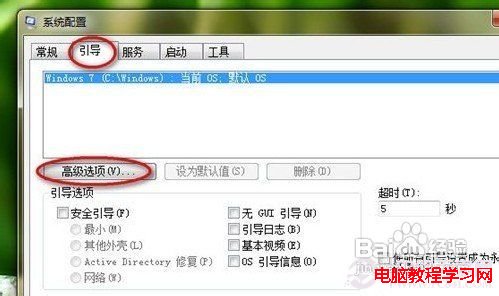
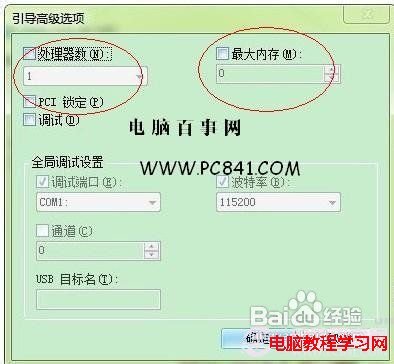
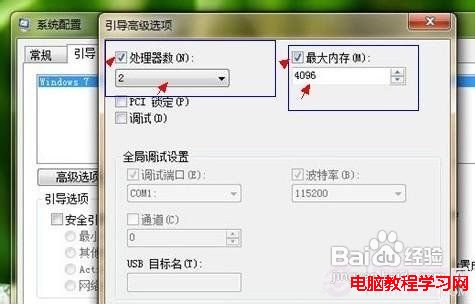
許多 Win7 用戶反映開機需 40 秒甚至 1-2 分鐘。開機速度取決於系統優化與硬體配置,以下分享實測有效的加速方法。
msconfig
透過金山衛士、360 衛士等工具禁用不必要的開機自啟程式,清理系統垃圾檔案。綜合上述優化,Win7 開機通常可控制在 30 秒內。若追求極致速度,建議加裝 SSD 做系統盤,並確認硬體符合 Win7 最低規格。
Windows 7 工作列寬度與位置自訂:解除鎖定拖曳調整寬度、移動至左/右/上邊緣
Win10 檔案總管導覽列隱藏可移除裝置?登錄搜尋法快速定位修改
Windows Server 2008 64位系統無聲音?教你啟用音頻服務完整圖解
Windows 系統核心檔案功能對照表(A-Z 完整版)
徹底關閉 Win10 鎖畫面與開始選單廣告:本地安全性原則 + 家庭版替代方案
WinXP 內建「圖片和傳真檢視器」列印多張照片在一張紙上,節省相紙環保又方便
Windows 10 系統需求完整版:最低與建議配置對照表
微軟修改 Win10 激活規則:重裝系統無需金鑰 雲端自動驗證