雖然 Win7 沒有內建定時開關機軟體,但可善用「工作排程器」達成自動關機,避免電腦長時間無人使用卻持續運作。
C:\Windows\System32\shutdown.exe(依實際安裝路徑調整)-s(關機)或 -f -s(強制關閉應用程式再關機)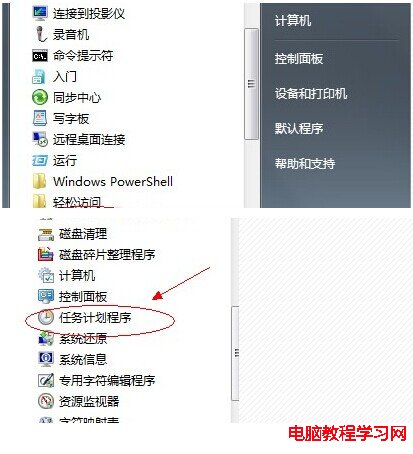
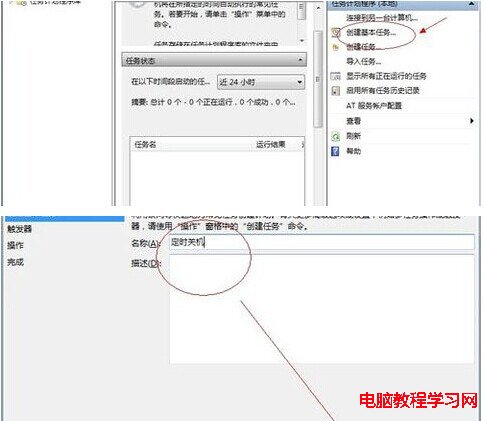
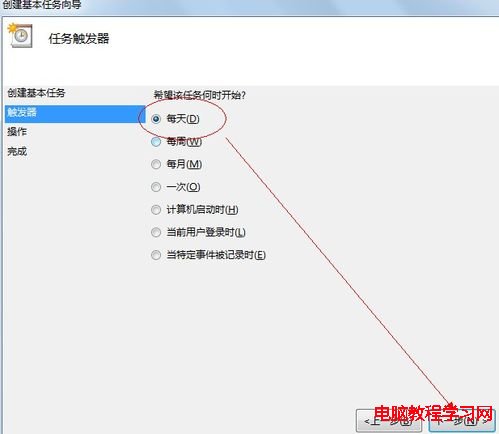
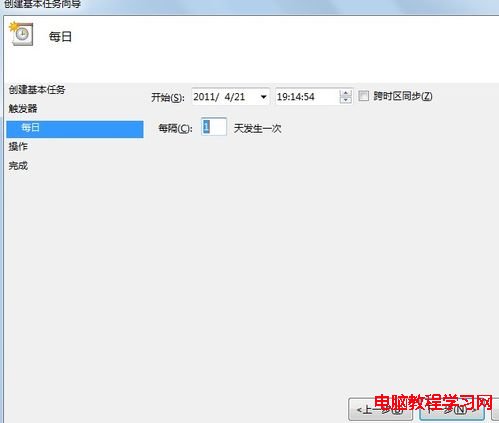
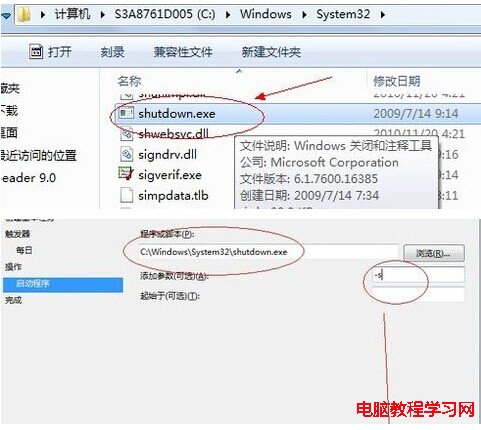
稍微懂電腦操作的朋友都能依樣畫葫蘆設定,希望能幫到您!
Windows 10 新功能全體驗評測:安裝、開始選單、視窗化 App、虛擬桌面、智慧分割
Win10 開始功能表與通知中心無法開啟?PowerShell 重新註冊 AppX 套件修復
Win8 「通訊連接埠初始化失敗」解決:netsh winsock reset 重置網路堆疊
停用 Windows Media Player 自動複製音樂 CD 功能
Win10 Mobile Build 12555 實測:全新通話介面、Office Excel 觸控版詳細體驗
Windows 8 建立 VPN 虛擬網路連線教學:適用企業遠端辦公