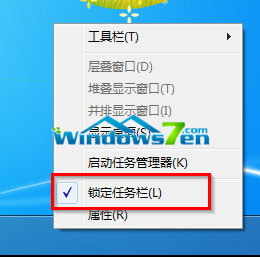
Windows 7 工作列支援高度自訂:
工作列組成:開始選單、快速啟動、應用程式區、語言列、通知區(系統匣)、顯示桌面按鈕(Win7 新增)。
【视频】Win10 正式版 Cortana 简体中文体验:快捷唤醒、提醒设置、笔记本查看
Win10 建立系統還原點教學:關鍵時刻一鍵回溯系統狀態
Win10 無法開機別慌:WinRE 恢復環境輕鬆修復、卸載問題更新、重裝系統
Windows 7 設定不待機/不睡眠:電源選項完整配置
Win7 建立桌面休眠捷徑教學:一鍵/熱鍵快速進入休眠
Win7 啟用網際網路連線共享 (ICS) 錯誤「Null」完整排解:防火牆服務才是關鍵
Windows 8.1 關閉 Windows Defender 教學:群組原則一鍵停用內建防毒
Win8 設定打字時顯示滑鼠指標:取消「輸入時隱藏指標」