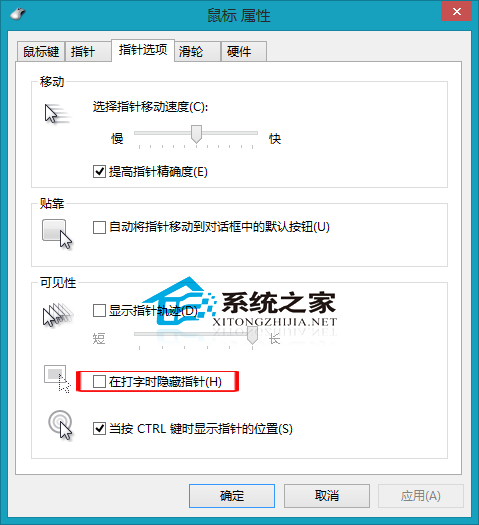
Win8 讓打字時保持滑鼠顯示:
需求者可依此設定。
Win10 開啟磁碟管理三種方法與推薦選擇
Win7 無法開啟/關閉防火牆?啟動 Windows Firewall 服務即可
如何關閉 Win10 線上搜尋(雲端搜尋)功能?兩步驟快速設定
Win7 環境變數 Path 設定兩法:CMD 臨時修改(關閉視窗失效)與系統屬性永久生效,附常用變數對照表
Win7 連接 VPN 出現錯誤 800 怎麼辦?防火牆、連接埠、主機設定四步驟排查
Win7 IE 分級審查如何設定?過濾不良網頁內容保護上網環境
Win10 Microsoft Edge (Spartan) 瀏覽器設定首頁、清除瀏覽資料、啟用 Flash 完整圖文教學
Win7 防火牆報錯 0x6D9?啟動 Windows Firewall 服務修復