IE10 預設隱藏了 IE8/9 時代的「快速導航」(Quick Tabs,熱鍵 Ctrl+Q),該功能可縮圖預覽所有開啟的分頁,快速切換。只需在網際網路選項中啟用即可找回。
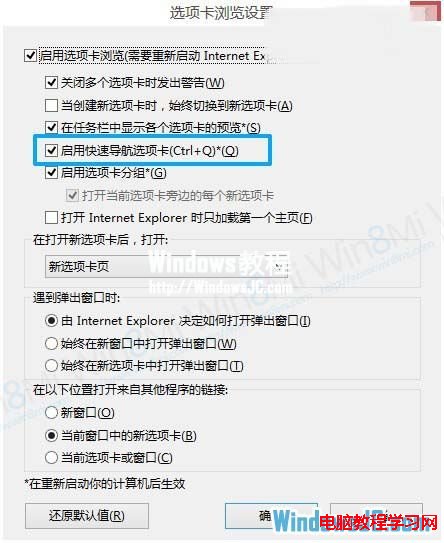
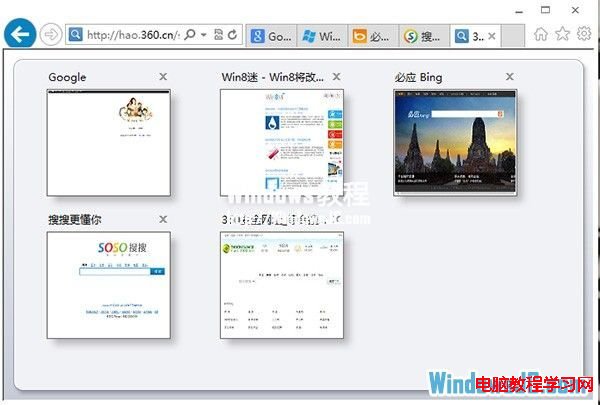
此功能對多開分頁用戶極為實用,建議開啟以提升瀏覽效率。
Win7 64位插入 USB 提示「請將磁碟插入磁碟機」?排查與修復全攻略
升級 Win10 10061 更新卡在 100% 不動怎麼辦?
Win7 螢幕截圖四大法:PrintScreen 全螢幕、Alt+PrintScreen 視窗、截圖工具、Ctrl+PrintScreen
Windows 10 Insider 家用版 Build 10163 截圖曝光,專注修正錯誤無明顯 UI 變化
Windows 10/8.1/7 全方位效能評測 (1):啟動速度 - Win 10 開機最慢,但睡眠/休眠喚醒最快
Win10 一週年更新 6 月 Bug 大掃除活動下周啟動 微軟集中修復高呼聲問題