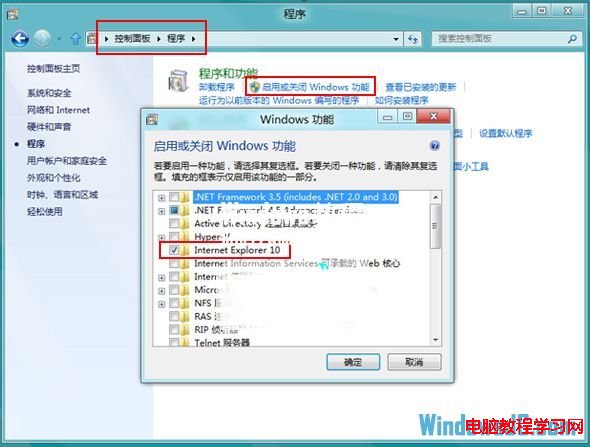
Windows 8 內建 IE10 且難以直接解除安裝。若偏好 Chrome、Firefox 等瀏覽器,可透過「開啟或關閉 Windows 功能」停用 IE10,系統將自動改用其他已安裝的瀏覽器作為預設。
此為「停用」而非「解除安裝」,如需恢復 IE10,同樣路徑勾選即可。若系統僅剩 IE10 一個瀏覽器,停用後將無法開啟網頁,請先安裝替代瀏覽器再操作。
Windows 7 內建家長控制功能完整設定教學
Win7 開機自動啟動 NVIDIA 設定怎麼關閉?停用 Display Driver Service 服務教學
Win8.1 更新 NVIDIA 驅動後藍屏?官方建議「自訂安裝-全新安裝」+ 拔除多螢幕
Win10 專業版移除關機選單「登出」選項:群組原則一鍵隱藏防止誤觸
Windows 10 關閉高對比度模式教學
Win10 玩 LoL 卡頓、藍屏、閃退?四大解決方案快速修復
Win10 無法啟動 Task Scheduler 服務?註冊表修改 Start 值快速修復
Windows 10 Build 10565 快速預覽版釋出 ISO 鏡像:全新激活方式測試