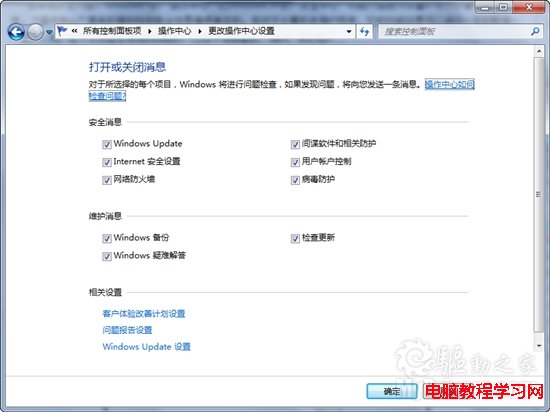
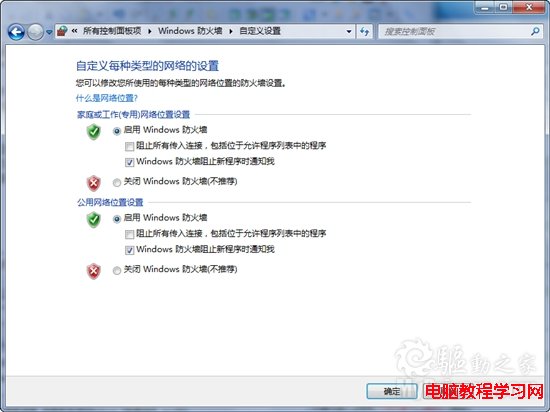
Windows 7 的「操作中心」整合了防火牆、Windows Update、疑難排解等安全維護通知,雖然貼心,但對進階用戶或追求淨桌面者顯得囉嗦。單純將個別通知設為「不通知」往往不徹底,仍會收到自動更新、錯誤報告等訊息。本文教您一勞永逸關閉所有操作中心通知。
此舉將徹底停用操作中心的彈出氣球與訊息列表,系統不再主動推送任何維護建議。若日後需恢復,只需重新勾選所需項目即可。
Win10 開機密碼忘記怎麼破解?PE 系統清除密碼圖文教程
Win7 修改網卡 MAC 位址(實體位址)繞過網路綁定限制
WinXP 提示「無法定位程序輸入點於動態連結庫」?補回缺失 DLL 修復
Windows 虛擬記憶體 pagefile.sys 刪除與移動完整教學:透過系統設定操作,勿手動刪除檔案
Windows 如何查詢電腦支援的最大記憶體容量?WMIC 指令一鍵查詢
Win7 建立桌面休眠捷徑教學:一鍵/熱鍵快速進入休眠
Windows XP 開機畫面與開機音樂自訂:零風險、秒級變身
Win7 找不到 DVD 光碟機驅動程式?刪除 UpperFilters/LowerFilters 修復 Code 52 錯誤