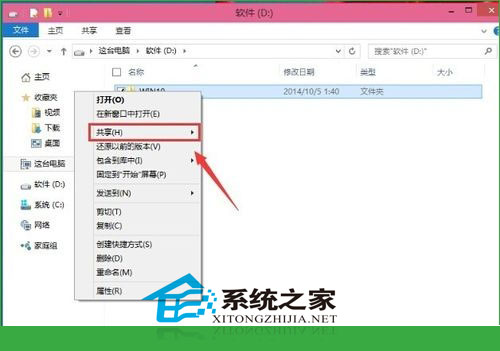
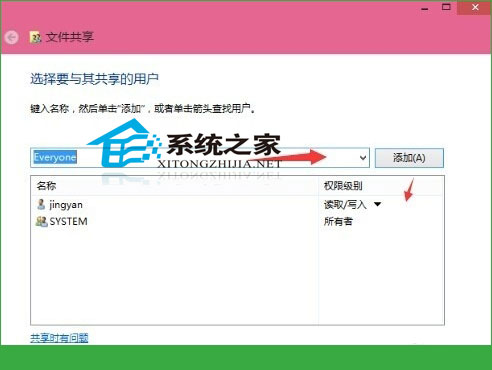
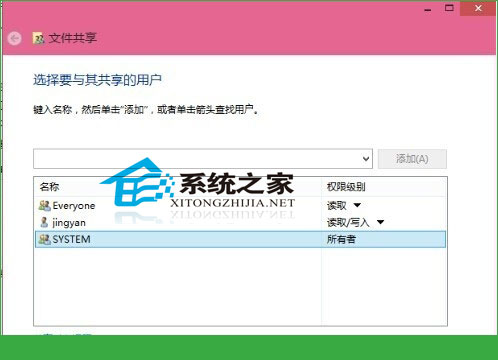
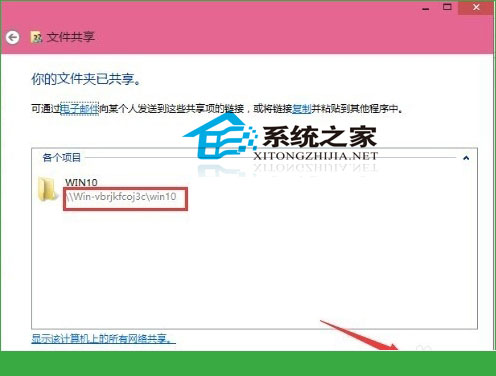
Win10 區網共用資料夾設定支援精細權限管理:
\\電腦名\共用資料夾名
建議依實際需求授權:內部團隊協作用「讀寫」,唯讀分享用「讀取」,避免資料外洩風險。
Win7 藍屏 KERNEL_DATA_INPAGE_ERROR (0x7A) 完整排查與修復指南
Win7 突然無法開啟 .txt 文字檔?命令提示字元修復檔案關聯
Win10 激活失敗 0xC004C003?官方說法:耐心等待伺服器恢復
Win10 安裝搜狗輸入法完整教學:官網下載 v7.8、取消廣告選項、Ctrl+Shift 切換
影片評測:Win10 Mobile vs WP8.1 Lumia 640 執行速度對比
【圖文】Win10 Build 9879 啟用 Aero 毛玻璃效果完整教學 (僅 64 位元)
關閉 Windows 8 螢幕保護程式喚醒時的登入畫面
Win10 任務列搜尋按鈕變搜尋列:登錄表啟用搜尋框模式