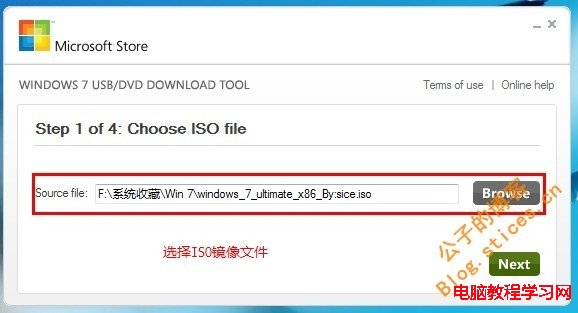
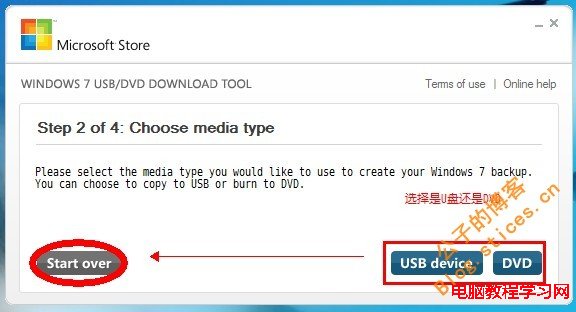
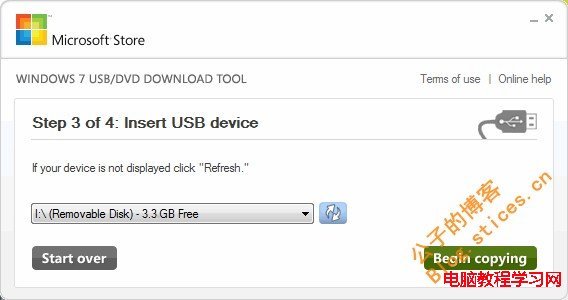
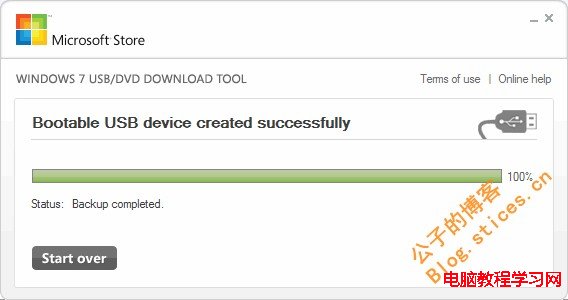
將 Windows 7 ISO 映像檔製作成可開機 USB 隨身碟,最簡單的方法是使用微軟官方釋出的 Windows 7 USB/DVD Download Tool,介面傻瓜化,新手也能輕鬆操作。
Windows 7 USB/DVD Download Tool
此工具支援 Windows 7 / 8 / 8.1 / 10 ISO 製作,是目前最穩定、相容性最好的官方製作工具。
Win7 工作列無法釘選程式、拖曳圖示出現禁止符號?註冊表一鍵修復
Win7 硬碟壞軌/檔案系統錯誤怎麼修?自動掃描修復與手動指令完整教學
Win7 內建網路疑難排解:自動檢測修復網路故障圖文教學
Win8玩CF(穿越火線)左右黑邊?註冊檔Scaling值與顯卡面板縮放全螢幕雙重修復
Win10 如何設定擴展顯示器?筆電雙螢幕設定完整教學
Windows 7 檔案無法複製貼上?鍵盤滑鼠皆失效,三步驟修復磁碟錯誤恢復正常
Win10 行事曆應用切換深色主題教學:五步驟完成個人化設定
解決 Win10 預覽版 Windows Defender 無法啟動的完整指南