Windows XP Windows 7 Windows 2003 Windows Vista Windows 綜合教學 Linux 系統教學
Windows 10 Windows 8 Windows 2008 Windows NT Windows Server 電腦軟體教學
您现在的位置: Windows教程網 >> Windows教程 >  >> Windows 綜合教學 >> 關於 Windows

Win10 無法開啟定位功能怎麼辦?啟用 Geolocation Service 解決

編輯:關於 Windows

Win10 定位功能打不開、灰色無法點選?通常是因為「Geolocation Service」服務未啟動。透過服務管理工具將其啟動類型改為「手動」並啟動服務,即可恢復定位功能。

修復步驟

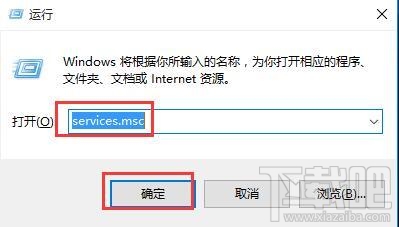
  1. 按 Win+R 輸入 services.msc 開啟服務管理員。
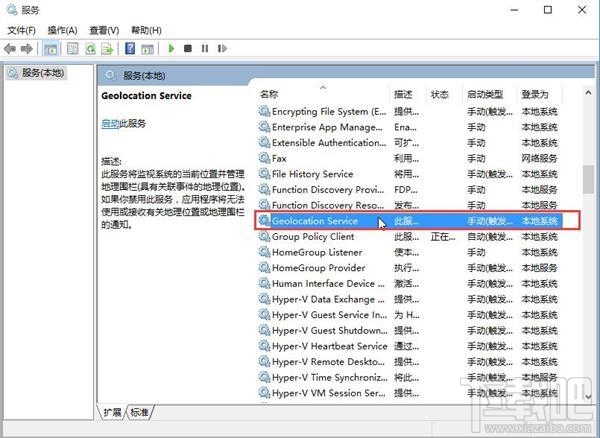
  2. 在右側列表找到「Geolocation Service」,雙擊開啟內容頁。
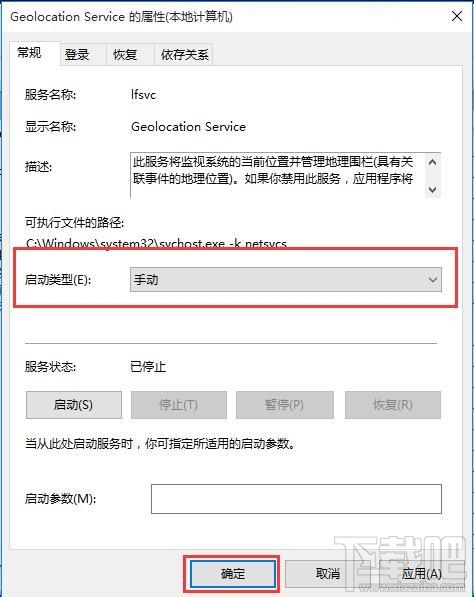
  3. 將「啟動類型」改為「手動」,點擊「套用」→「確定」。
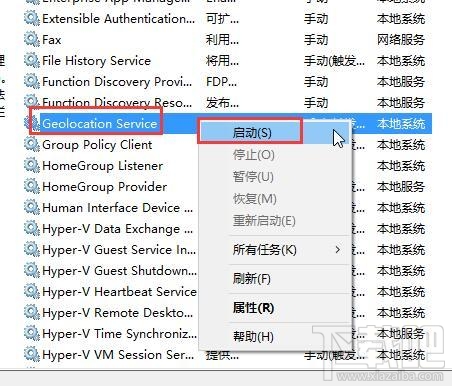
  4. 回到服務列表,右鍵點擊「Geolocation Service」選擇「啟動」。
  5. 完成後回到設定頁,定位功能即可正常開啟。

開啟 services.msc

Geolocation Service 內容頁

改為手動啟動類型

右鍵啟動服務

Copyright © Windows教程網 All Rights Reserved