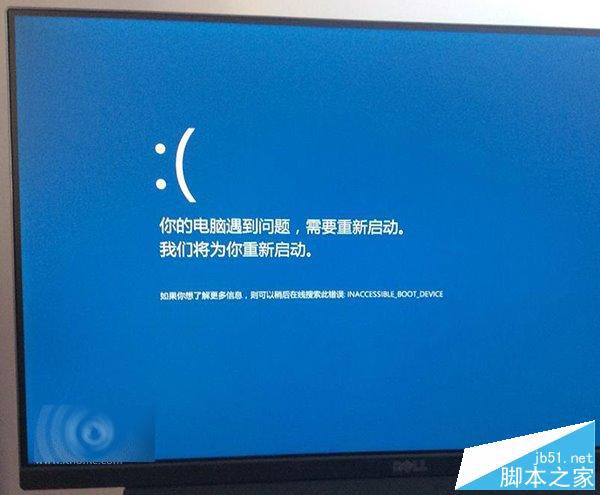
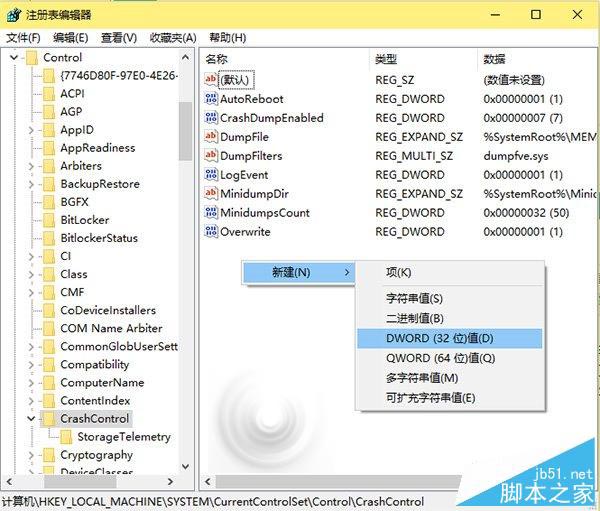
Win10 藍畫面預設僅顯示哭臉圖示與簡略錯誤代碼,專業用戶習慣查看詳細參數。可透過登錄表修改恢復詳細資訊:
建議先備份登錄表 (可使用軟媒魔方清理大師備份)。
regedit
HKEY_LOCAL_MACHINE\SYSTEM\CurrentControlSet\Control\CrashControl
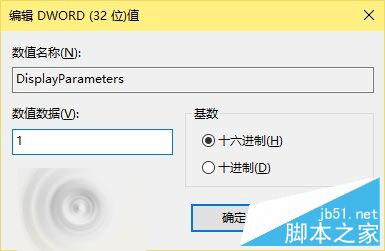
DisplayParameters
1
修改完成後,下次藍畫面將顯示完整錯誤參數。希望永遠用不上這項修改!
Win10 Build 10576 簡體中文專業版 64 位 ISO 鏡像網盤下載 (含校驗碼)
Win10 专业版 N 是什么?欧洲反垄断版,移除 Windows Media Player
Win8 如何開啟 .igs 3D 模型檔?使用 Regaligs 檢視器免安裝瀏覽
Win10 Cortana 小娜無聲音/不說話?乾淨啟動排除第三方衝突
Win8 出現 wermgr.exe 應用程式錯誤與擴展屬性不一致的解決方案
Win10 TH2 正式版 KB3140741 更新內容:改善服務堆疊、免重開機
XP 系統磁碟格式轉換 FAT32 轉 NTFS 兩種方法(含不砍資料指令法)
Win10 側載模式是什麼?繞過應用商店直接安裝測試第三方應用的開發者功能