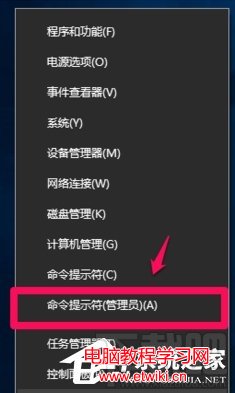
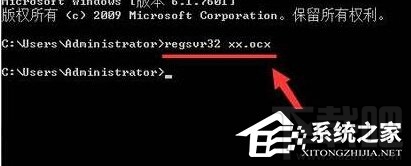
在 Windows 10 註冊 .ocx 元件時若出現 0x80040200 錯誤,通常是權限不足。需以系統管理員身分執行命令提示字元並註冊。
regsvr32 xxx.ocx
xxx.ocx
cd
Windows 10 正式版何時發布?首年免費升級,預計夏季 (最晚 8 月) 上市
Win8磁碟修復後D盤變RAW/0位元組拒絕存取?專業資料救援與修復指南
Win10 進入安全模式最快法:Win+R 執行 msconfig 勾選安全開機重開機
IE11 相容性檢視清單無法保存解決:取消「關閉時刪除歷史」、停用保護模式、授予登錄權限
Win10 將常用網站釘選到開始選單,一鍵直達提升效率
Win8 設定固定 IP 位址教學,透過控制台網路介面卡屬性手動輸入 IP、DNS
Win7 瀏覽器提示「伺服器安全憑證尚未生效」?多半是系統時間錯誤
微軟 Windows Server 2003 延長付費支援:澳洲維多利亞州政府年付 440 萬澳元