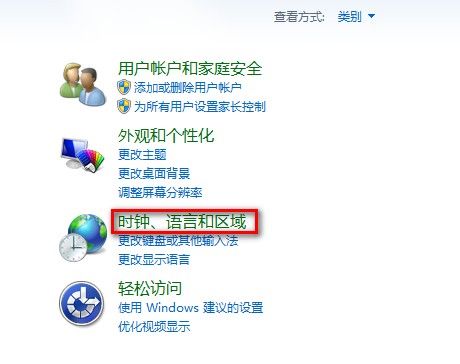
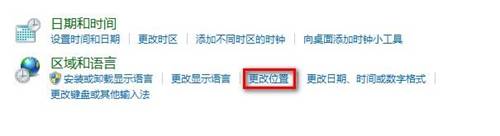
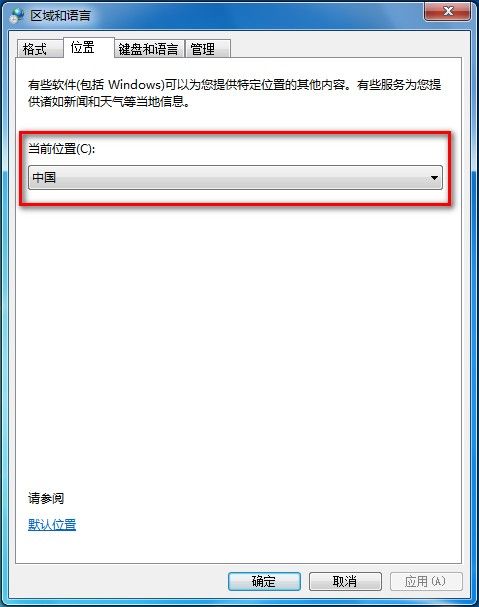
Windows 7 地理位置設定影響部分應用程式 (如天氣、地圖、搜尋) 的本地化內容:
Win10 10130 應用商店閃退解法:開啟開始選單保持前景、更新商店應用
使用 USB 隨身碟與 UEFI 模式安裝 Windows 10 最新預覽版完整教學
Win10 Mobile Build 10080 因多項 Bug 取消慢速通道推送,下一版再更新
Win10 Mobile 正式版全新 Aero 毛玻璃特效概念圖曝光:高斯模糊視覺升級
Win10 RTM 簡體中文正式版 ISO 鏡像下載大全 含各版本校驗碼
品牌電腦預裝 Win8/Win8.1 OEM 版產品金鑰查看方法總覽
電腦如何將耳機與揚聲器設為獨立音源:Realtek/通用音效控制台「喇叭與耳機獨立音源」選項一鍵開啟
XP 開機進入桌面卡住幾分鐘:msconfig 恢復「正常啟動」根治