Windows XP Windows 7 Windows 2003 Windows Vista Windows 綜合教學 Linux 系統教學
Windows 10 Windows 8 Windows 2008 Windows NT Windows Server 電腦軟體教學
您现在的位置: Windows教程網 >> Windows教程 >  >> Windows 綜合教學 >> 關於 Windows

Windows 10 如何停用索引服務 (Windows Search) 完整步驟

編輯:關於 Windows

停用 Windows Search 索引服務以減少磁碟 IO

若不常使用搜尋功能,或為 SSD 延長壽命,可停用索引服務。

操作步驟

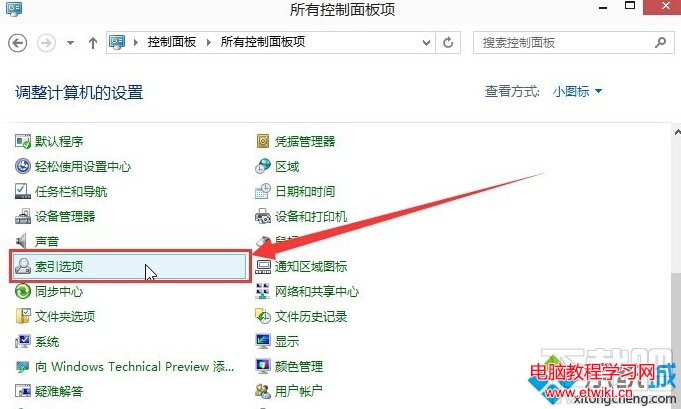
  1. 開啟「控制台」→ 檢視模式「小圖示」→ 雙擊「索引選項」。
  2. 點擊「進階」→ 「重建」 (可選,清除現有索引) → 確定。
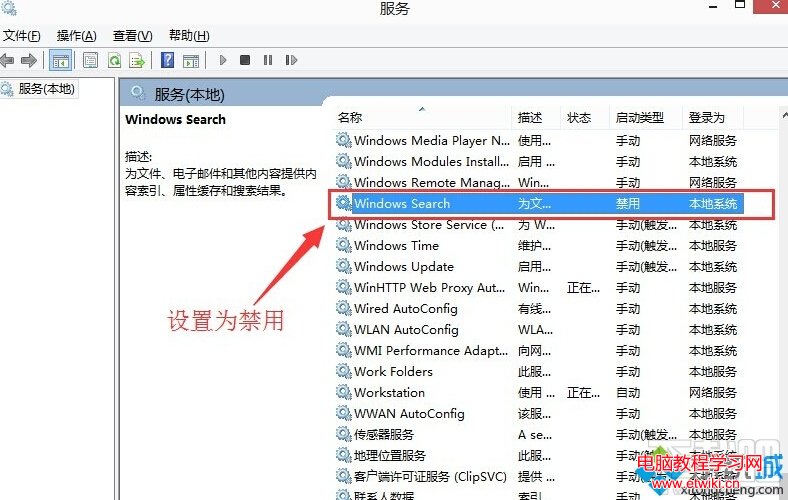
  3. 按 Win+X 選擇「執行」,輸入 services.msc 開啟服務。
  4. 找到「Windows Search」,雙擊開啟內容。
  5. 「啟動類型」改為「停用」,「服務狀態」點擊「停止」,確定。
索引選項
進階選項重建
重建索引確認
Windows Search 服務停用

說明

  • 停用後,檔案搜尋速度會變慢 (不使用索引),但可減少背景磁碟活動。
  • 若需恢復,將啟動類型改回「自動」並啟動服務即可。
Copyright © Windows教程網 All Rights Reserved