現今電腦記憶體普遍超過 4GB,64 位元系統已成主流。安裝軟體時常需選擇 32 位元或 64 位元版本,因此確認自己系統位元數相當重要。以下提供最快速的查看方法。
查看步驟
- 開啟系統屬性
在桌面或檔案總管中找到「電腦」(Win 8/10 稱為「這台電腦」),按右鍵選擇「內容」。
- 查看系統類型
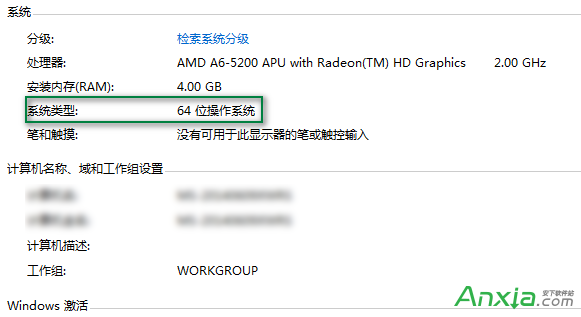
在「系統」視窗中,找到「系統類型」一欄:
- 顯示 x64-based processor 或 64 位元作業系統 → 為 64 位元系統。
- 顯示 x86-based processor 或 32 位元作業系統 → 為 32 位元系統。

補充說明: Windows XP 系統 99% 為 32 位元,極少數發燒友會安裝 64 位元版 XP。若不想手動查看,也可使用線上檢測工具(如「32位/64位系統線上檢測」)一鍵判斷。