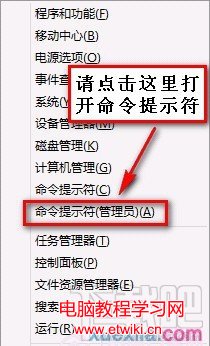
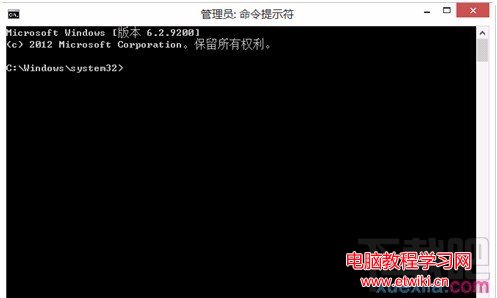
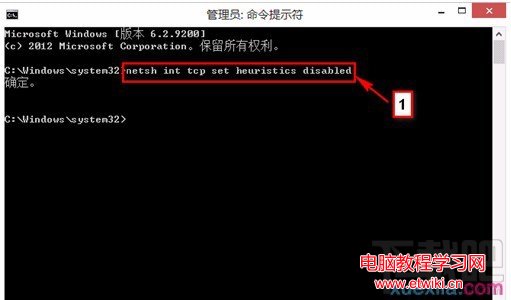
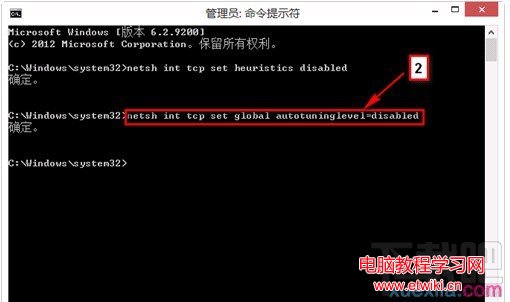
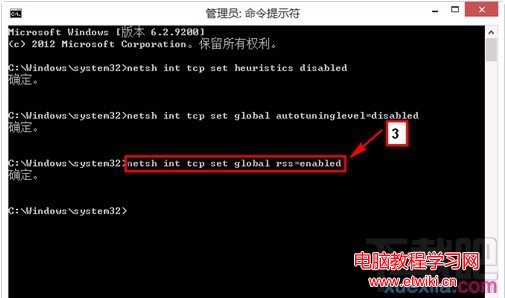
預裝 Win8 筆電常見有線/無線網路顯示「受限」。管理員權限 CMD 執行三條指令即可修復:
netsh int tcp set heuristics disabled
netsh int tcp set global autotuninglevel=disabled
netsh int tcp set global rss=enabled
此法針對 TCP 接收端縮放與啟發式演算法導致的連線問題,屬經典解法。
Win8/8.1/10回收站如何恢复“删除确认对话框”?勾选一项即可
Win10 內建 ZIP 壓縮/解壓縮功能,右鍵選單秒完成
Win10 Mobile 14393.321 終於修復 Lumia 636/638 導航列遮擋問題
Windows 7 系統備份與還原點建立完整操作指南
Win10 安裝 .NET Framework 3.5 失敗 0x80070003?登錄表殘留帳戶資料是主因
Windows 7 定時關機教學:使用工作排程器輕鬆設定
Win7 硬盤指示燈狂閃?三大「硬盤殺手」服務一鍵禁用
微軟停止預裝 Win7 家用/旗艦版:為 Win9 鋪路,逼退 Win7 龐大存量用戶