Win7 一般關閉防火牆僅停用基本過濾,若需徹底停用(含進階規則),必須進入「進階安全性 Windows 防火牆」:
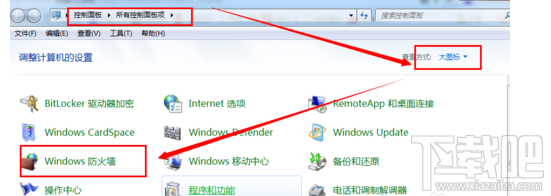
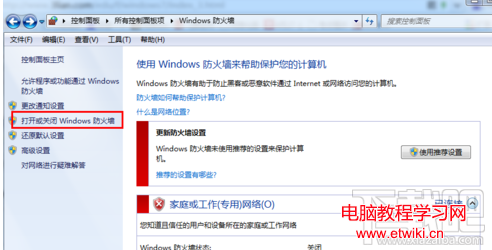
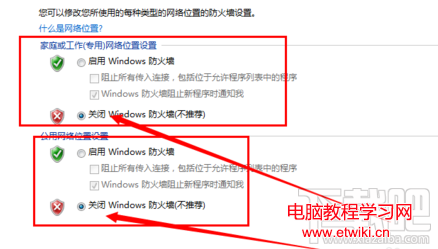
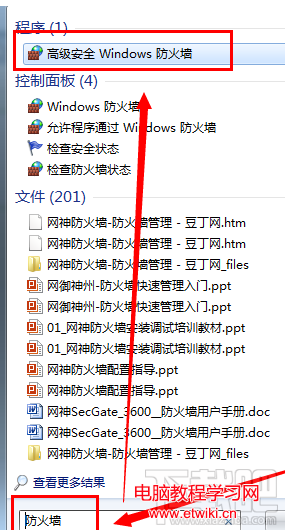
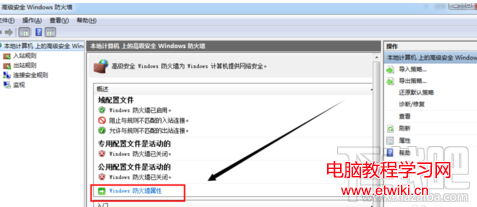
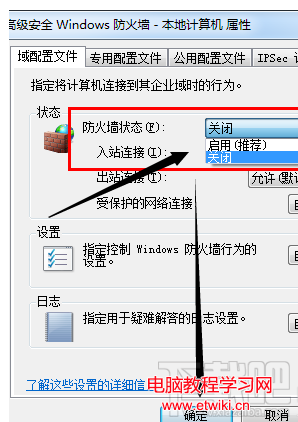
此法可確保所有進階連線規則(輸入/輸出/連線安全性)全數停用,適合特定測試環境。
Win7 如何開啟手寫輸入面板 (Tablet PC 輸入面板)?工作列工具列一鍵啟用
全新時代來臨:Microsoft Edge 瀏覽器正式登場 (Build 10135 關鍵里程碑)
微軟模擬飛行網頁版登陸 Edge:展示 WebGL/WebAudio/手柄 API,免費可玩,Chrome/Firefox 也能跑
Win8 右鍵「開啟方式」出現雙重「Windows 相片檢視器」?刪除多餘 Program Files 資料夾即可
Windows 8 應用程式閃退、無法存取指定裝置路徑檔案?啟用內建管理員帳號與修正權限雙管齊下
Win10 檔案總管「共用」按鈕使用教學:快速分享檔案至郵件、社群軟體
Windows 10 如何自訂視窗標題列高度與捲軸寬度?登錄表修改 CaptionHeight 與 ScrollWidth 鍵值