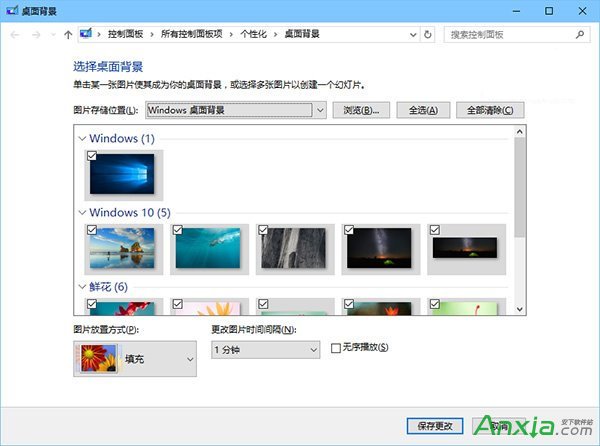
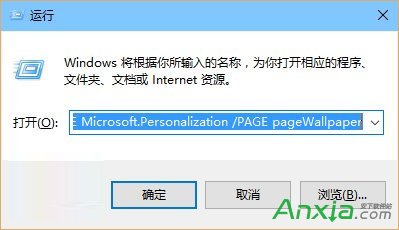
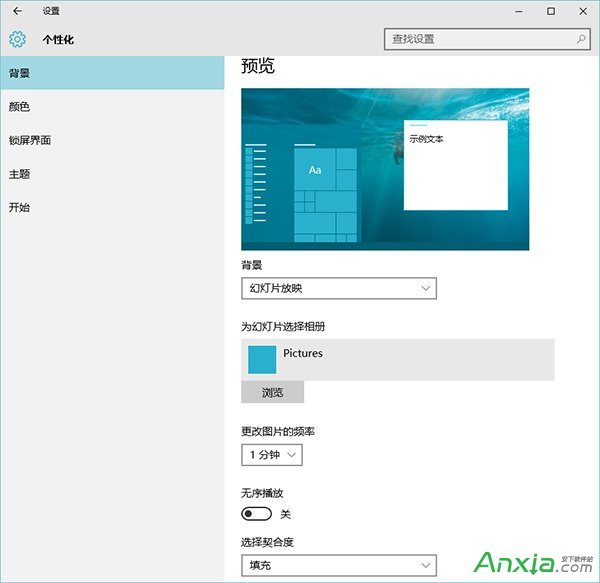
Win10 新版「設定」介面的桌布輪換功能選項較少(間隔時間固定、難指定資料夾)。其實傳統控制台版「桌面背景」仍保留,功能更完整(支援自訂間隔、直接選取系統內建圖庫)。
%windir%\System32\control.exe /NAME Microsoft.Personalization /PAGE pageWallpaper
傳統介面在「圖片位置」下拉選單直接列出「Windows 桌布」、「單色」等分類,無需手動瀏覽路徑,體驗優於新版介面。
Windows 10 新增/設定英文輸入法為預設輸入法教學
使用 USB 隨身碟建立 Windows 7 密碼重設磁碟防止忘記密碼
Win7 Windows Audio 服務啟動失敗錯誤 1079?變更登入身分為 Local Service 解決
Win10 Build 10576 簡體中文專業版 32 位 ISO 鏡像下載 (含 SHA1 校驗)
Win7 電腦頻繁自動重開機?九大常見原因與排查對策
IE11 彈出「管理增益集」提示框解決:重設瀏覽器或登錄檔修改臨時屏蔽
Windows 8 RP 內建 Flash 導致顯卡驅動停止回應/綠屏/花屏?暫時緩解方案
Windows 7 調整視覺效果為最佳效能:透過系統進階設定關閉動畫與特效