Windows XP Windows 7 Windows 2003 Windows Vista Windows 綜合教學 Linux 系統教學
Windows 10 Windows 8 Windows 2008 Windows NT Windows Server 電腦軟體教學
您现在的位置: Windows教程網 >> Windows教程 >  >> Windows 綜合教學 >> 關於 Windows

Win10 右鍵開始按鈕沒反應?註冊表補回 IsShortcut 修復

編輯:關於 Windows

Win10 右鍵開始按鈕應彈出「高級使用者選單」(Win+X 選單),若無反應但左鍵正常,通常是註冊表缺少 IsShortcut 字串值。同樣適用 Win8.1。
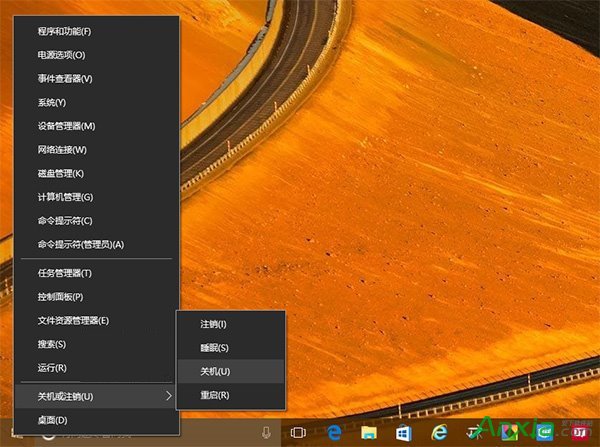
右鍵開始按鈕無反應

修復步驟(先備份註冊表)

  1. Win+R → regedit 開啟註冊表編輯器。
  2. 定位 HKEY_CLASSES_ROOT\lnkfile,右側空白處右鍵 → 新增 → 字串值 → 命名 IsShortcut,數值資料留空。
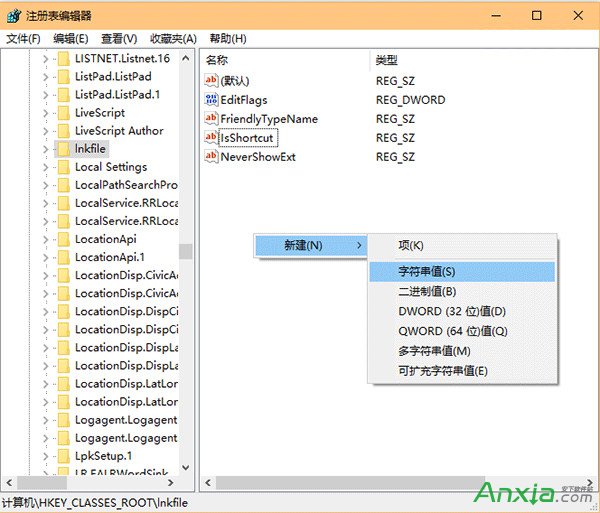
    lnkfile 新增 IsShortcut
  3. 同樣定位 HKEY_CLASSES_ROOT\piffile,新增同名字串值 IsShortcut。
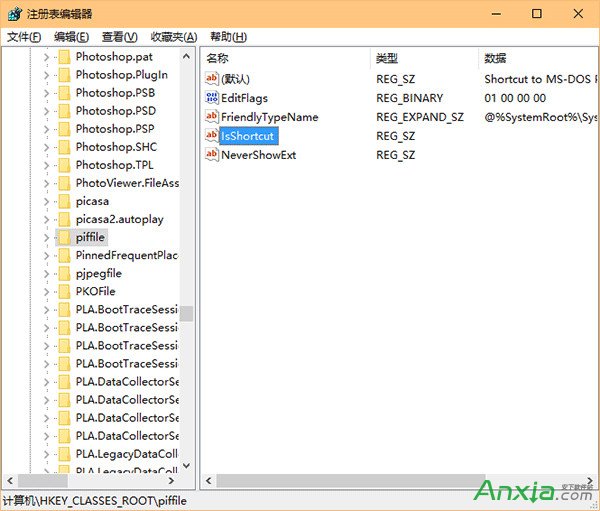
    piffile 新增 IsShortcut
  4. 重啟總管(工作管理員 → Windows 檔案總管 → 重新啟動)或重開機,右鍵選單即恢復。

提醒: 操作註冊表前建議用「軟媒魔方」等工具備份,防誤改導致系統異常。

Copyright © Windows教程網 All Rights Reserved