Windows XP Windows 7 Windows 2003 Windows Vista Windows 綜合教學 Linux 系統教學
Windows 10 Windows 8 Windows 2008 Windows NT Windows Server 電腦軟體教學
您现在的位置: Windows教程網 >> Windows教程 >  >> Windows 綜合教學 >> 關於 Windows

Win7 點擊關機卻變重啟修復:網卡「喚醒模式比對」導致誤判重啟,停用即解決

編輯:關於 Windows

Win7 點「關機」電腦卻重新開機,常見原因:網卡進階屬性中「喚醒模式比對」啟用,網路封包觸發誤喚醒。修復步驟:

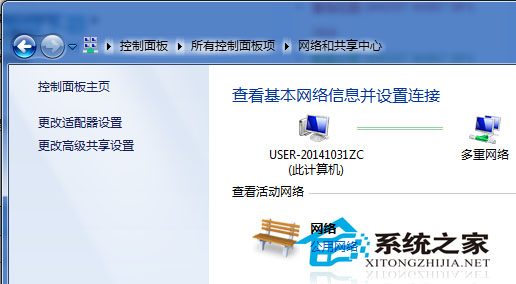
  1. 控制台 → 「網路和共用中心」 → 「變更介面卡設定」。
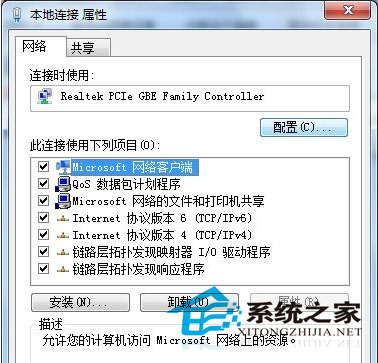
  2. 右鍵「區域連線」/ 網卡名稱 → 「內容」 → 「設定」。
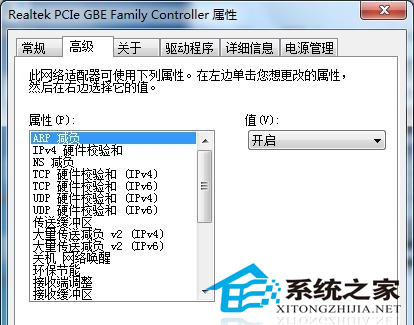
  3. 「進階」分頁 → 找到「Wake on Magic Packet」「Wake on Pattern Match」等喚醒相關項目 → 設為「停用」。
  4. 確定 → 重啟電腦驗證關機正常。

此問題常由優化軟體誤開啟喚醒選項、或驅動程式預設值導致。停用後不影響正常網路功能,僅失去遠端喚醒 (WOL) 能力。

Copyright © Windows教程網 All Rights Reserved