Windows XP Windows 7 Windows 2003 Windows Vista Windows 綜合教學 Linux 系統教學
Windows 10 Windows 8 Windows 2008 Windows NT Windows Server 電腦軟體教學
您现在的位置: Windows教程網 >> Windows教程 >  >> Windows 綜合教學 >> 關於 Windows

桌機升級 Win10 後網速變慢?檢查驅動程式與群組原則 QoS 設定

編輯:關於 Windows

升級 Windows 10 後若發現網頁開啟緩慢、下載速度下降,可能原因為網卡驅動程式不相容,或群組原則中「基於原則的 QoS」限制頻寬。本文提供兩步驟排查流程。

步驟一:更新網卡驅動程式

使用驅動程式更新工具(如 Driver Booster、Snappy Driver Installer)或至網卡廠商官網下載最新 Windows 10 版本驅動程式安裝。

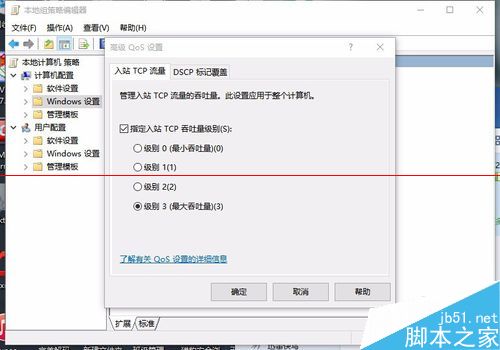
步驟二:調整進階 QoS 設定

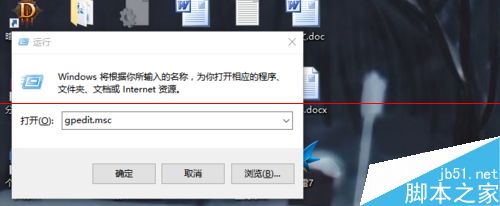
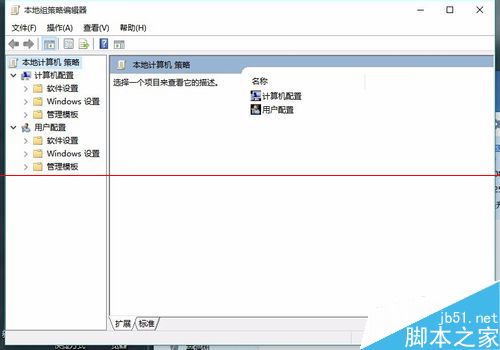
  1. 按 Win+R 輸入 gpedit.msc 開啟群組原則編輯器。
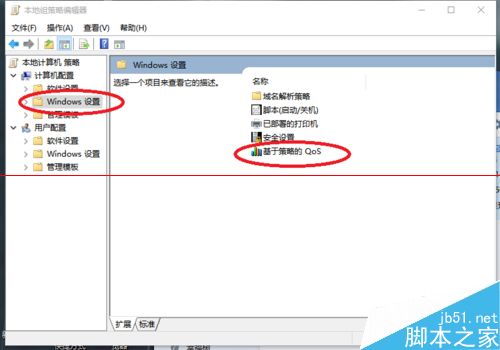
  2. 依序展開:電腦設定 → Windows 設定 → 原則式 QoS。
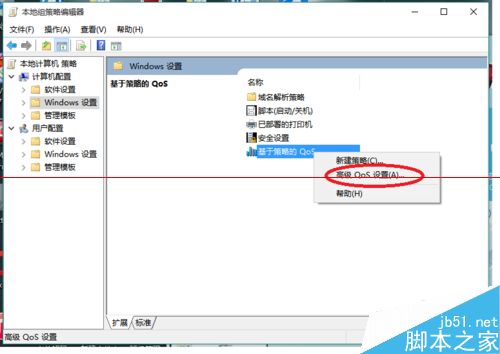
  3. 右鍵「原則式 QoS」→「進階 QoS 設定」。
  4. 在「QoS 原則」頁面確認無異常限制原則;若有不明原則建議停用或刪除。

補充說明

群組原則編輯器僅 Windows 10 專業版/企業版/教育版提供,家用版可透過登錄檔對應機鍵 HKEY_LOCAL_MACHINE\SOFTWARE\Policies\Microsoft\Windows\QoS 進行調整。

Copyright © Windows教程網 All Rights Reserved