Windows XP Windows 7 Windows 2003 Windows Vista Windows 綜合教學 Linux 系統教學
Windows 10 Windows 8 Windows 2008 Windows NT Windows Server 電腦軟體教學
您现在的位置: Windows教程網 >> Windows教程 >  >> Windows 綜合教學 >> 關於 Windows

Win7 關閉磁碟寫入保護功能,解決 USB 隨身碟/移動硬碟無法複製檔案

編輯:關於 Windows

使用電腦時常用移動硬碟或 USB 隨身碟拷貝資料,若出現「磁碟受寫入保護」提示,無法讀寫,通常是系統啟用了磁碟保護功能。關閉該功能即可解決。

推薦:一鍵重裝系統

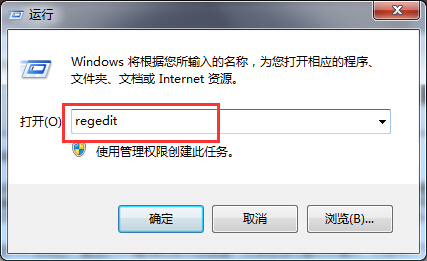
  1. 按 Win+R 開啟「執行」,輸入 regedit 開啟登錄表編輯器;
  2. 依序展開 HKEY_LOCAL_MACHINE\SYSTEM\CurrentControlSet\Control\StorageDevicePolicies,右鍵空白處選「新增」→「DWORD (32 位元) 值」;
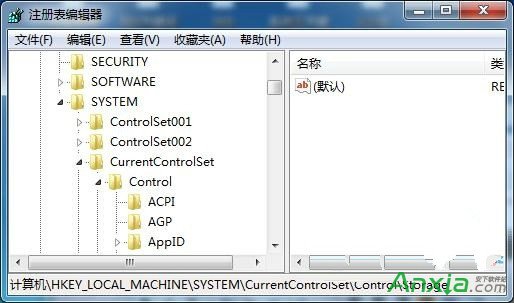
  3. 將新建值命名為 WriteProtect,數值資料設為 0。

透過登錄表修改禁用磁碟寫入保護,即可解決 USB 裝置提示受保護無法拷貝檔案的問題。

Copyright © Windows教程網 All Rights Reserved