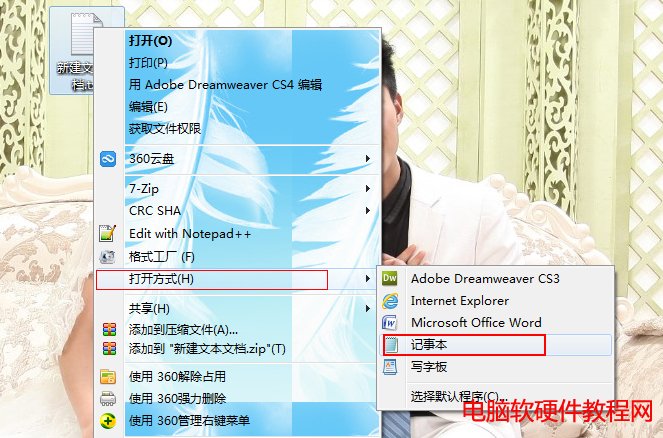
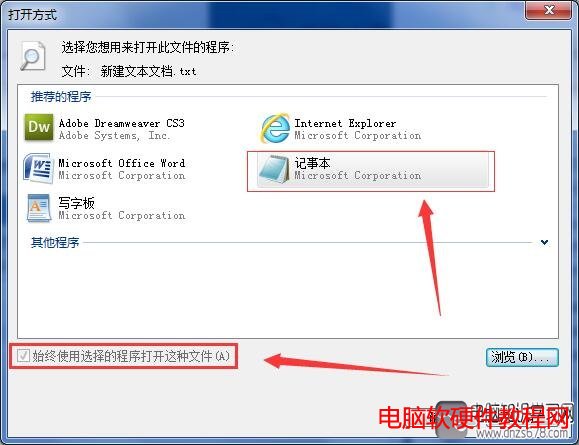
Win7 雙擊 .txt 檔無反應/錯誤,多為檔案關聯錯誤導致。重新關聯至記事本即可修復。
C:\Windows\System32\notepad.exe
notepad.exe
C:\Windows\System32\
此法適用所有檔案類型關聯錯誤,核心動作:右鍵 → 開啟方式 → 選擇預設程式 → 勾選始終使用 → 確定。
Windows 7 直接查看已儲存無線網路密碼(明文)
升級 Win10 正式版後:關機不再強制安裝更新,唯有重啟才會套用
Windows 10 開啟應用程式商店/相容模式提示 explorer.exe 找不到元素?切換開始選單/畫面模式解決
Win10 IE 瀏覽器頻繁彈出「Internet Explorer 已停止運作」?停用第三方擴充與自動崩潰恢復
Win7/XP 禁用/恢復控制台、註冊表編輯器、群組原則:註冊表鍵值與 gpedit.msc 雙重管控
Win8/Win8.1 右鍵選單新增 Windows Defender 掃描功能
Win7 建立 VPN 連線 (連線到工作區) 圖文教學
Win10 升級逾 30 天仍可無痛降級:保留 Windows.old 與 $Windows.~BT 資料夾關鍵技巧