卸載軟體後其服務可能殘留於登錄檔,佔用記憶體。可透過登錄檔編輯器手動移除。
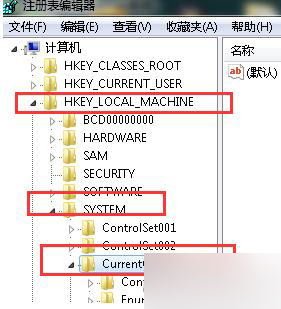
regedit.exe
HKEY_LOCAL_MACHINE\SYSTEM\CurrentControlSet\Services
注意:請確認服務確為無用再刪除,誤刪系統關鍵服務可能導致系統不穩定。
Windows 10 設定應用程式相容模式解決軟體不相容問題
winlogon.exe 應用程式錯誤 0x018d063c 解決:修補系統漏洞
Win8 忘記本地密碼不重裝解法:重置電腦恢復出廠狀態
Win10 分螢幕快速鍵大全:Win+方向鍵分割視窗、虛擬桌面、工作檢視教學
傲梅分區助手 Win 10 版詳細使用教學:調整大小、遷移系統、合併分區實戰
Win10 一週年更新 14332 官方 ISO 鏡像下載(簡體中文 32/64 位元家庭/專業/企業版)
Windows 10 預覽版 9879 更新步驟完整教學
Win10 連接 XP 共享印表機完整圖文教學