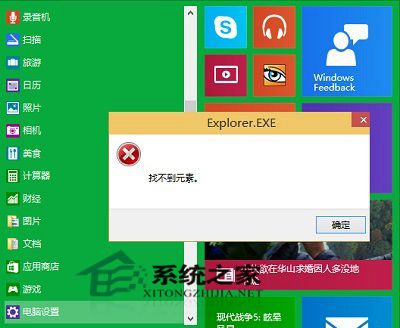
Windows 10 技術預覽版使用者回報:開啟應用程式商店、使用相容模式安裝軟體、開啟設定等操作提示 explorer.exe - 找不到元素 錯誤。經測試,切換「開始選單」與「開始畫面」模式可修復此問題。
explorer.exe - 找不到元素
Windows 10 預覽版 Bug 眾多,建議僅於虛擬機或測試機體驗,主力機請等待正式版。
Windows 7 清除隱藏裝置與過期驅動程式:解決不明原因重啟死機
Windows 10 未插 USB 裝置卻顯示「安全移除硬體」圖示的兩種修復方法
Win 10 升級後開機慢顯示錯誤 0xC0000001 解決法:重裝電源驅動程式
Win7 攝影機在哪?裝置管理員尋找驅動路徑建立捷徑至「電腦」
Windows 8 系統自動登入設定教學:免輸入密碼直接進入桌面
Win10/WP8.1 微軟帳戶恢復代碼重要性:帳戶被盜/鎖定時的最後救命稻草
Win8.1 Mouse without Borders 滑鼠失效「無法連線找不到主機」?官方修復工具自動修復
Windows 7 插入耳機/喇叭無聲音故障診斷與修復:內建疑難排解工具