使用 Win7 系統瀏覽網頁時,部分不安全網站會自動下載垃圾軟體或惡意程式,對系統安全構成威脅。我們可以透過本機群組原則編輯器,啟用「限制檔案下載」功能,有效阻擋瀏覽器自動下載行為。以下為具體設定流程。
gpedit.msc 並按 Enter,啟動本機群組原則編輯器。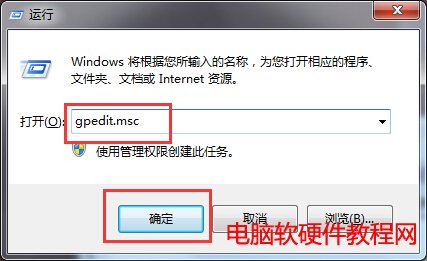
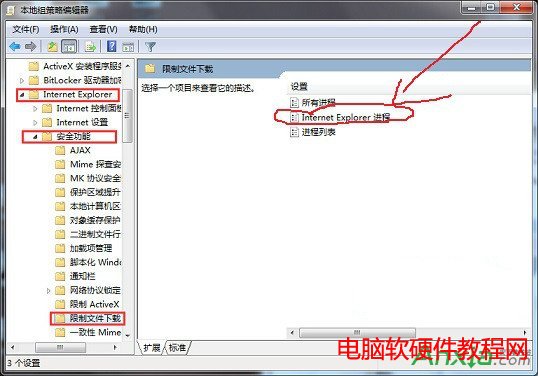
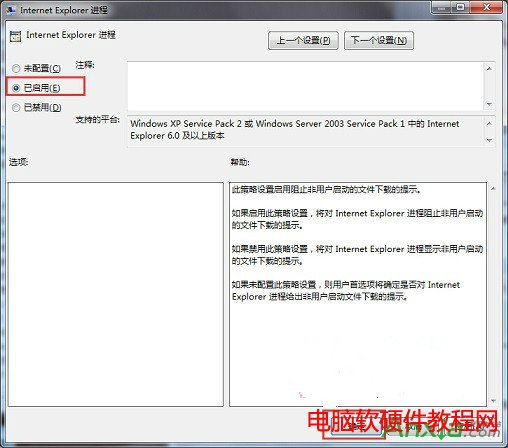
自動下載多發生於不安全網站,啟用此功能可大幅降低中毒風險,建議所有 Win7 使用者配置完成。
Win10 永久啟用後如何備份啟用金鑰?重裝系統離線還原教學
XP 系統使用 FinalData 恢復硬碟資料完整教學(誤刪、格式化、分區遺失)
Win10 企業版裝機量曝光:付費安裝超 150 萬台,企業級遷移加速
Windows 8.1 更新安裝成功重開機卻提示失敗回滾解決:卸載更新、清理元件存放區、刪除 SoftwareDistribution 暫存檔、重新更新四步驟
Win10 Build 10049 問題修復匯總:登入藍畫面、Outlook 搜尋、虛擬機相容、照片應用崩潰、開始畫面透明、鎖定卡頓 + 反饋管道
Win7 如何解除安裝 JDK 工具包?控制台程式與功能兩步移除