Windows XP Windows 7 Windows 2003 Windows Vista Windows 綜合教學 Linux 系統教學
Windows 10 Windows 8 Windows 2008 Windows NT Windows Server 電腦軟體教學
您现在的位置: Windows教程網 >> Windows教程 >  >> Windows 綜合教學 >> 關於 Windows

Win7 誤刪 sam 檔案導致系統無法啟動?USB 開機進入 PE 還原 RegBack 備份解決

編輯:關於 Windows

Win7 系統誤刪 sam 檔案導致無法正常啟動,可使用 USB 開機工具進入 PE 系統,從 RegBack 備份資料夾還原 SAM 檔案快速修復。
修復步驟

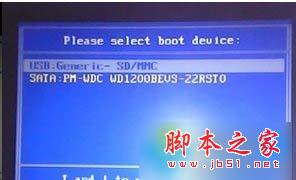
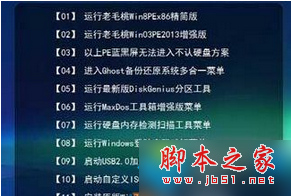
  1. 開機選單選擇 USB 開機,進入 PE 系統選單選擇選項 1。
  2. 進入 PE 後,開啟 C:\Windows\System32\config\RegBack 複製一份 SAM 檔案。
  3. 將 SAM 檔案貼上至 C:\Windows\System32\config 資料夾覆蓋,重新開機即可修復。

以上為 Win7 誤刪 sam 檔案的圖文修復教學,透過 USB 開機進入 PE 還原 RegBack 備份即可解決。更多精彩教學請關注本站!

Copyright © Windows教程網 All Rights Reserved