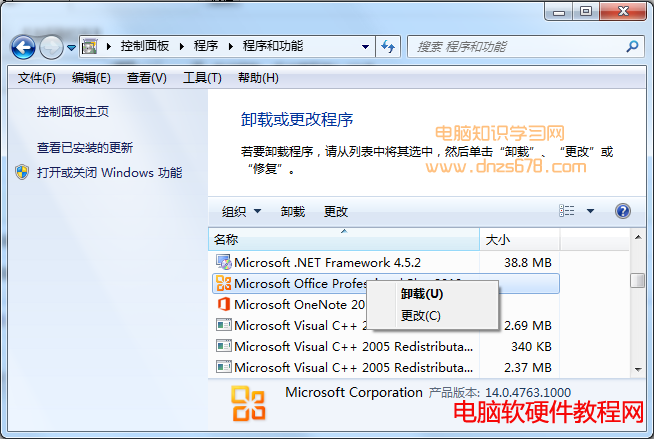
許多軟體 (特別是流氓軟體) 安裝後不在開始選單建立解除安裝捷徑。解法:
控制面板「解除安裝程式」介面
集中管理,徹底清除不需軟體。
Windows 8 設定自動登入免輸入密碼 (netplwiz 圖文教學)
Win7 誤刪系統隱藏分區導致崩潰?安裝盤修復引導分區教學
盜版 Windows 用 360/騰訊/官方升級 Win10 真的能洗白嗎?實測三種方式激活情況
重裝 Win10 純淨版教學:格式化 C 盤全新安裝避免舊系統殘留
Win10 本機帳號如何切換為 Microsoft 帳號?啟用商店/同步/雲端功能
Win8.1 升級 Win10 報錯 0xc770010c?關閉防火牆後重試即可
Win10 筆電調整螢幕亮度:Win+X 呼叫行動中心 → 顯示器亮度滑桿
Win7 硬碟安裝 Ubuntu Kylin 14.10 完整圖文教程(無需 WUBI)