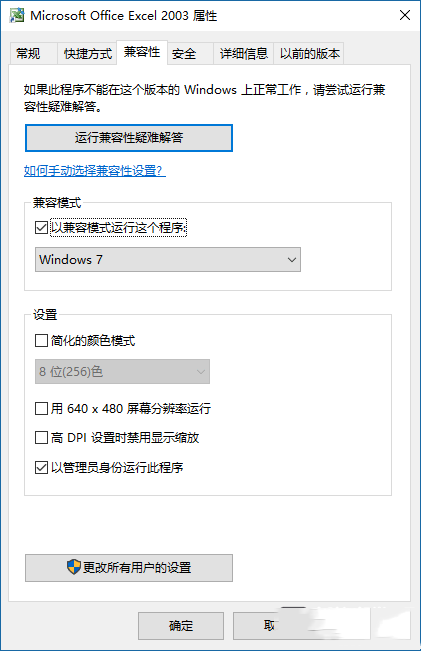
升級 Windows 10 後原有 Office 2003/2007/2010 等版本無法啟動,因 Win10 安全防護等級提高加上 Office 憑證到期被阻擋。
完整移除舊版 Office 並重新安裝相容版本。
方案二無需重裝即可快速恢復 Office 正常運作,測試 Office 2003 於 Win10 相容模式下可正常運行。
Windows XP VPN 連線頻繁自動斷線四大解決方案:MTU、ICS、伺服器 IP、系統版本
Windows 8 開機慢、磁碟 100% 終極優化:4K 對齊 + 十大系統調教
Win7 移除/修復程式:控制台「程式和功能」四步驟完成
Win10 工作列電源圖示消失或變灰無法開啟?重置電池驅動程式即可恢復
Win8.1 安裝 Office 跳 Osetup.dll 錯誤?提取覆蓋即可修復
WinXP 設定 Caps Lock 鍵關閉大寫鎖定,告別誤觸輸入錯誤
Windows 7 解除安裝程式教學:控制台「程式與功能」完整操作
Win10 最完美開始菜單神器:Classic Shell 深度評測與下載