Win8.1 安裝 Office 2007 時彈出 Setup Error:Osetup.dll 錯誤,原因通常是安裝來源媒體中的 CAB 壓縮檔損壞或不完整,導致關鍵 DLL 遺失。解決方式是從 CAB 檔手動提取該檔案覆蓋回安裝目錄。
E:\Office2007\ProPlus.WW\Osetup.dll。ProPlus.WW.cab(約 260 MB)。Osetup.dll 到桌面或任意資料夾。Osetup.dll 複製覆蓋回目標目錄 E:\Office2007\ProPlus.WW\。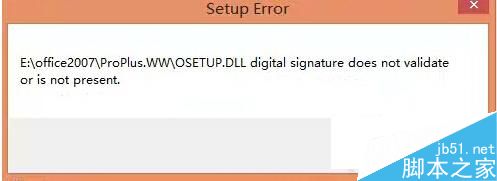
Windows 7 禁止登錄編輯器被修改:群組原則鎖定 Regedit 保護系統設定
Windows XP 內建錄音機:零安裝、操作簡單的錄音小工具完整教學
Windows Server 2008 Active Directory 群組類型與作用域詳解:安全性群組 vs 通訊群組、網域本機 vs 全域 vs 通用
Windows 10 四月累積更新:Edge/IE11 正式停用不安全的 RC4 加密演算法
Windows 7 自訂快速啟動列開啟緩慢:MSE 即時掃描導致
Win7 修改群組原則:讓 Windows Update 安裝更新後不再強制重新開機
Windows Server 2003 無法識別移動硬碟解決方案:啟用 Removable Storage 服務與磁碟管理指派磁碟機代號