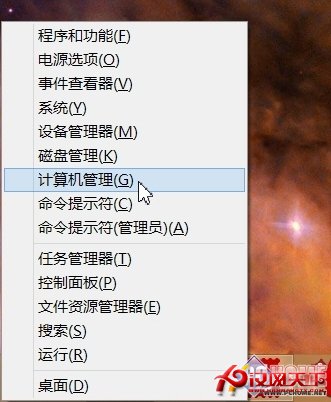
新電腦到手優化系統服務可釋放資源。將非必要服務從「自動」改為「手動」(非「停用」,避免需要時無法啟動),可提升效能。操作路徑:Win + X →「電腦管理」→「服務與應用程式」→「服務」,雙擊服務修改啟動類型為「手動」。
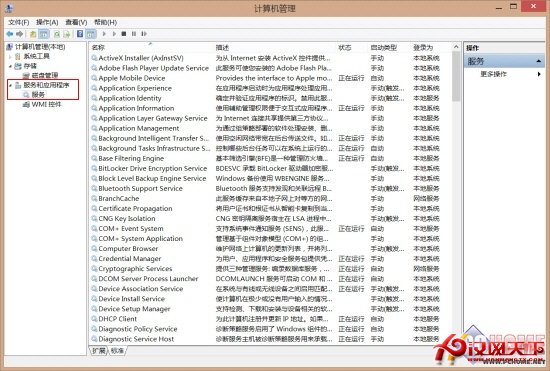
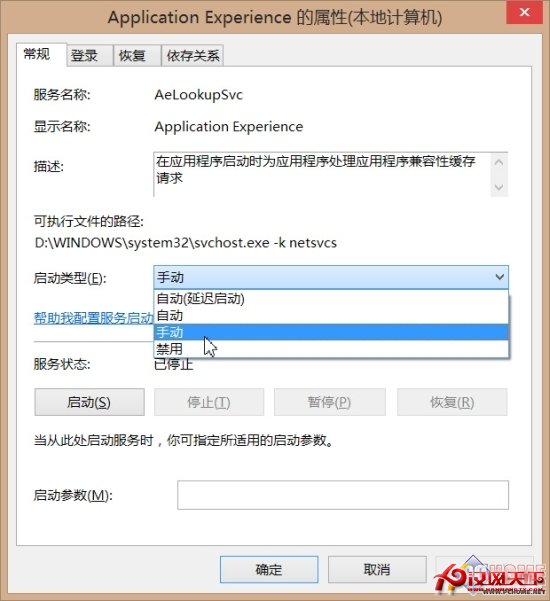
可安全改為手動的服務(按名稱排序)
- Application Experience(程式相容性快取請求)
- Computer Browser(網路電腦清單維護,無聯網需求可手動)
- Diagnostic Policy Service(診斷原則服務)
- Distributed Link Tracking Client(NTFS 檔案連結追蹤)
- IP Helper(IPv6 轉換技術)
- Offline Files(離線檔案服務)
- Program Compatibility Assistant Service(應用程式相容性助手)
- Portable Device Enumerator Service(可移動大容量儲存裝置群組原則)
- Print Spooler(無印表機可關閉)
- Remote Registry(遠端登錄編輯,建議保持停用)
- Secondary Logon(不同認證啟動程序,改手動;停用會導致魔獸世界等遊戲無法登入)
- Security Center(安全中心監控)
- Server(網路共享支援,單機可手動)
- TCP/IP NetBIOS Helper(NetBIOS 名稱解析,非工作群組環境可手動)
- Windows Error Reporting Service(錯誤回報)
- Windows Image Acquisition (WIA)(掃描儀/相機影像擷取)
- Windows Search(內容索引,少用內建搜尋可手動)
- Windows Time(時間日期同步)
提醒:修改後若系統或軟體異常,請還原原設定。