Windows XP Windows 7 Windows 2003 Windows Vista Windows 綜合教學 Linux 系統教學
Windows 10 Windows 8 Windows 2008 Windows NT Windows Server 電腦軟體教學

Windows 8.1 無法更改系統提示音?登錄修改 ExcludeFromCPL 恢復聲音設定選項

編輯:Win8 常見問題解答

Windows 8.1 聲音設定中缺少「Windows 登入/登出/解除鎖定/關機」等事件的音效自訂選項,實為登錄鍵值 ExcludeFromCPL 隱藏所致。修改登錄即可恢復完整設定介面。
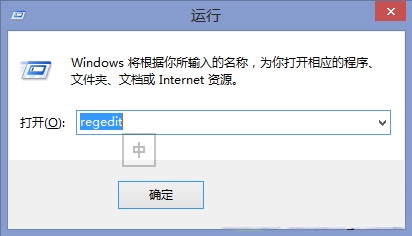
修復步驟

  1. Win+R 輸入 regedit 開啟登錄編輯器。
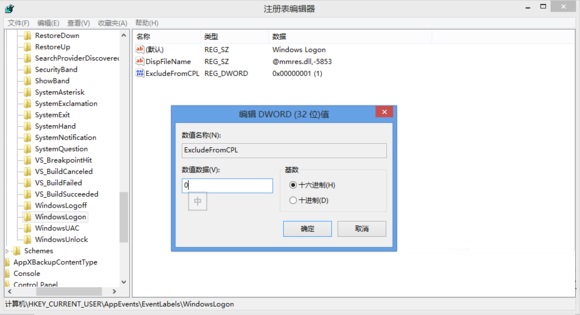
  2. 導覽至:HKEY_CURRENT_USER\AppEvents\EventLabels
  3. 依序展開 WindowsLogon、WindowsLogoff、WindowsUnlock、SystemExit,在右側找到 ExcludeFromCPL,將值從 1 改為 0 或直接刪除該值。
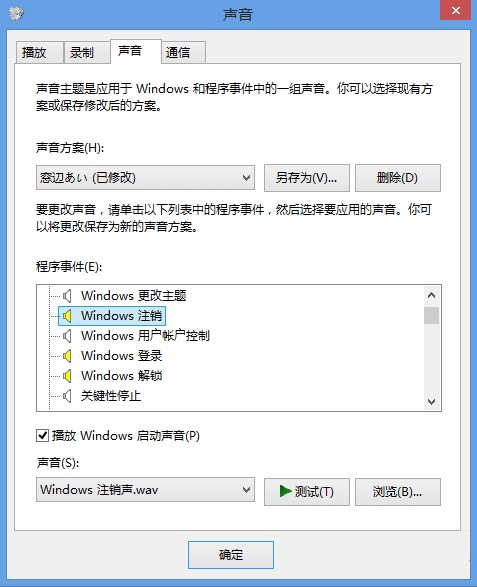
  4. 關閉登錄編輯器,重新開啟「聲音」設定,原本隱藏的事件選項將全部恢復。

此為微軟預設隱藏的系統事件音效自訂功能,透過登錄調整即可解鎖,無需第三方工具。

Copyright © Windows教程網 All Rights Reserved