Windows XP Windows 7 Windows 2003 Windows Vista Windows 綜合教學 Linux 系統教學
Windows 10 Windows 8 Windows 2008 Windows NT Windows Server 電腦軟體教學

Windows 8 關閉防火牆方法(圖文詳細版)

編輯:Win8 系統應用技巧

本文提供與 84085 相同的關閉防火牆步驟,但圖文更詳細,適合初學者參考。操作路徑:Win+C → 設定 → 控制台 → Windows 防火牆 → 開啟或關閉 → 專用/公用網路全選關閉。


詳細圖文步驟

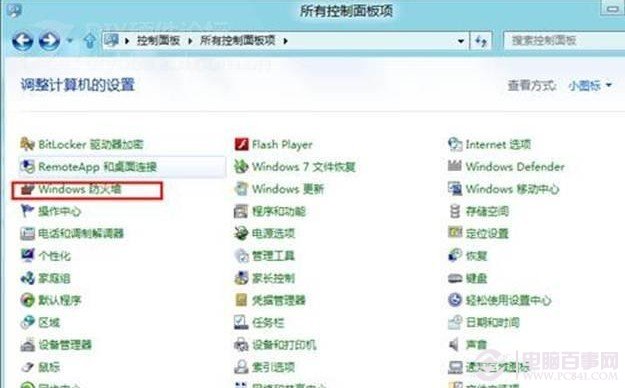
  1. 按 Win+C 呼叫 Charms 列,點「設定」齒輪圖示 → 「控制台」。
  2. 控制台右上角切「大圖示」 → 點「Windows 防火牆」。
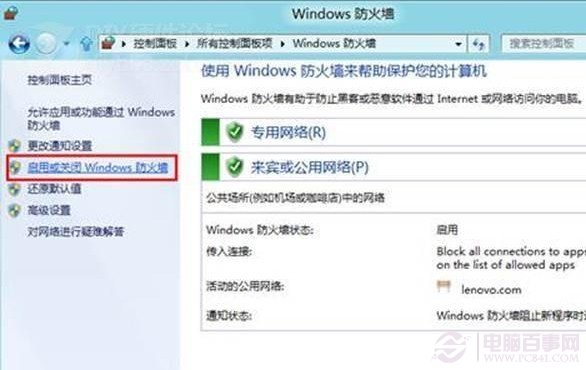
  3. 左欄點「開啟或關閉 Windows 防火牆」。
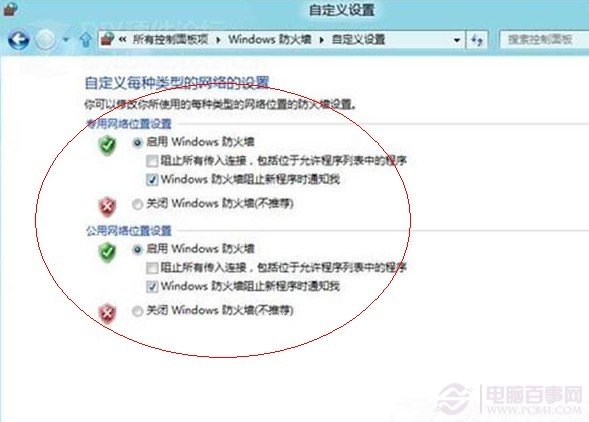
  4. 「專用網路設定」與「公用網路設定」均勾選「關閉 Windows 防火牆(不建議)」 → 確定。

防火牆進階功能

Win8 防火牆支援針對專用/公用網路分別設定輸入/輸出規則、通知行為,功能較 Win7/XP 大幅增強。

建議

僅在已安裝具備防火牆功能的第三方防毒軟體(如 Kaspersky、Norton、趨勢科技)且確認其防火牆正常運作時,才建議關閉系統防火牆以節省資源。單純為「省資源」關閉極不建議。

Copyright © Windows教程網 All Rights Reserved