Windows XP Windows 7 Windows 2003 Windows Vista Windows 綜合教學 Linux 系統教學
Windows 10 Windows 8 Windows 2008 Windows NT Windows Server 電腦軟體教學

不用軟體解壓 Windows 8/8.1 install.wim:DISM 指令掛載提取檔案

編輯:Win8 系統應用技巧

Windows 8/8.1 安裝映像 install.wim 含多版本,可用 DISM 指令直接掛載提取,無需第三方解壓軟體。

步驟

  1. 查詢版本索引:
    dism /get-wiminfo /wimfile:"F:\win8.1\sources\install.wim"
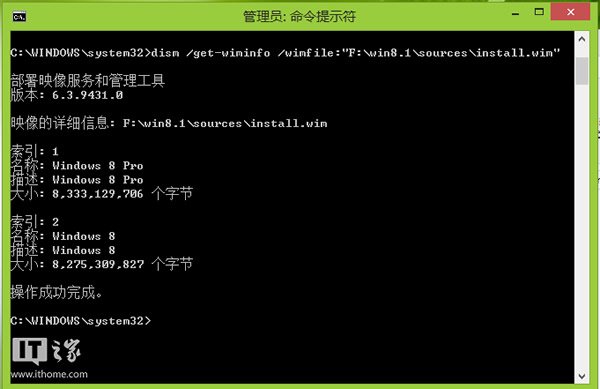
    圖示:索引 1 為 Pro,索引 2 為標準版。
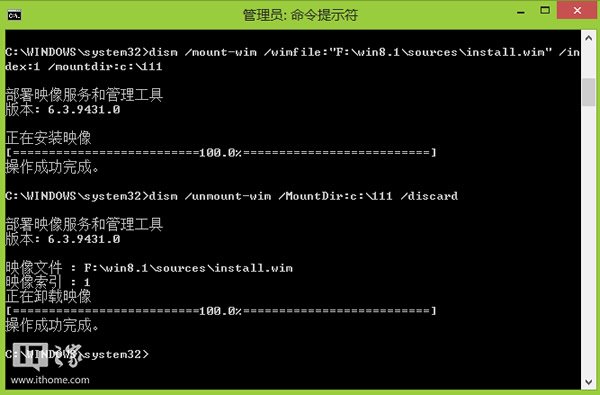
  2. 掛載映像:將索引 1 掛載至 C:\111:
    dism /mount-wim /wimfile:"F:\win8.1\sources\install.wim" /index:1 /mountdir:C:\111
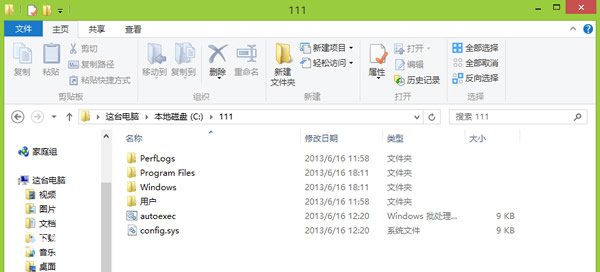
    完成後開啟 C:\111 複製所需檔案。
  3. 卸載映像:關閉資料夾後執行:
    dism /unmount-wim /MountDir:C:\111 /discard
    C:\111 恢復空資料夾。

DISM 掛載方式高效提取 WIM 內檔案,適用 Windows 8 與 8.1,無需龐大解壓空間。

Copyright © Windows教程網 All Rights Reserved