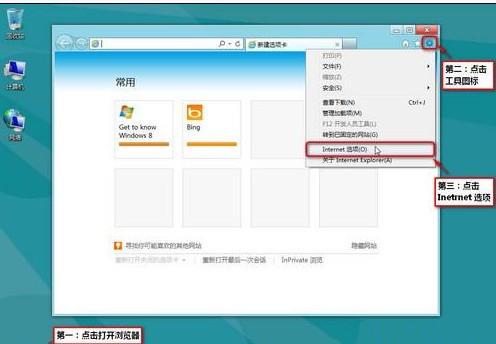
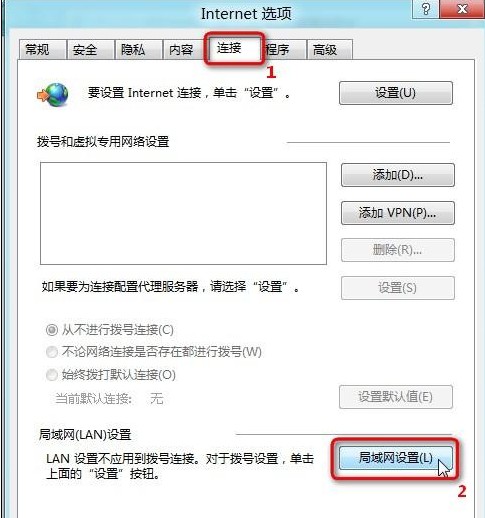
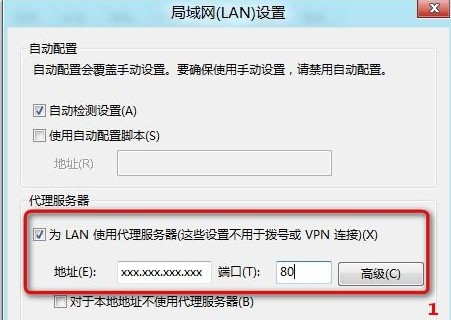
透過 IE 設定 LAN Proxy 伺服器位址與連接埠,套用於 HTTP/HTTPS 流量。
Windows 8 動態磁貼小知識:啟用/關閉、尺寸差異、內容豐富度
Win8 輸入法圖示消失解決:工作列屬性啟用「輸入指示器」、缺少 Scm 資料夾補救
Windows 8 自動播放啟用/停用與各媒體個別動作設定
Win8 解決 QQ 假死不回應:關閉 QQ 透明皮膚特效
Win8.1 利用指令快速查看系統安裝日期 systeminfo 技巧
Windows 8 一鍵顯示隱藏檔案:檔案總管「檢視」索引標籤快速切換
Win8 例行更新報錯 8024200D?DISM 掃描修復映像兩條命令搞定
Windows 8 登入更個性化:圖片密碼建立教學,觸控滑鼠通用,三手勢組合比傳統密碼更安全