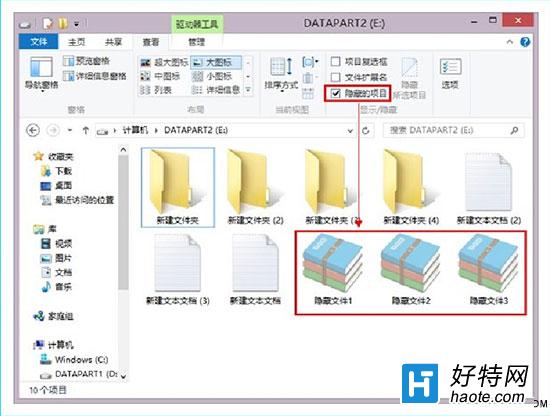
Windows 8 檔案總管採用 Ribbon 介面,顯示隱藏檔案僅需兩步驟,無需進入控制台「資料夾選項」。
即時生效,隱藏檔案、資料夾與受保護的作業系統檔案(若同時勾選「隱藏受保護的作業系統檔案」則不會顯示)將立即顯示於清單中。取消勾選即可恢復隱藏。
Win8.1 SkyDrive 離線可用設置:右鍵文件/資料夾選「離線可用」或全域啟用「離線存取所有檔案」
Win8 滑鼠壞了怎麼辦?啟用「滑鼠鍵」用小鍵盤代替操作
Win8 開啟內建閱讀器應用:開始畫面 → 搜尋/所有應用程式 → 閱讀器 (支援 PDF/XPS)
Windows 8 無法開啟 App/無法登入商店解決方案:建立 Microsoft 帳號並綁定
Win8.1 開始畫面「應用程式檢視」變身傳統開始選單:四大設定完美復刻 Win7 體驗
Win8.1 電源管理設定教學:控制台電源選項 → 平衡/省電/高效能/自訂 四大模式詳細設定
Win8 如何修改標題列與提示框字體大小?調整 DPI 縮放比例解決字體過小
Win8.1 開啟傳統 F8 進入安全模式:關閉快速啟動 + bcdedit