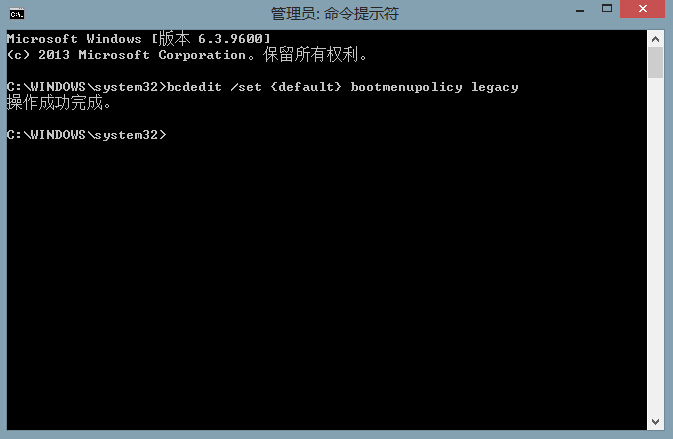
Win8.1 採用混合式快速啟動,導致開機時按 F8 無法進入安全模式。需先關閉快速啟動,再修改開機原則:
bcdedit /set {default} bootmenupolicy legacy
重新開機,開機時連按 F8 應可見傳統安全模式選單。若要還原預設快速啟動模式,執行: bcdedit /set {default} bootmenupolicy standard
bcdedit /set {default} bootmenupolicy standard
Win8 IE 瀏覽器停用分頁瀏覽:Internet 選項還原單視窗模式
Win8 取消程式錯誤「連線檢查解決方案」提示:修改登錄檔將管理工具啟動器改為 MMC
Windows 8 與 Windows RT 詳細比較:發布日期、價格、硬體、續航、介面、軟體、企業功能全面解析
FIFA 14在Win8.1聯網閃退怎麼辦?乾淨啟動+補丁雙管齊下
Windows 8 檔案總管 Ribbon 介面必學技巧大全
Windows 8 磁碟清理與最佳化完整操作:碎片整理、釋放空間、排程自動維護
Windows 8 查看 Windows Update 更新歷史記錄:兩步驟快速掌握已安裝補丁
Win8.1 Microsoft 帳號登入卡在「請稍候」?重新註冊帳號、修復系統檔案或改用本地帳號