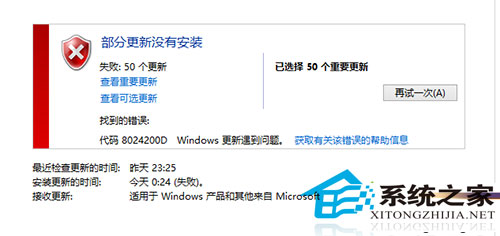
Win8 Windows Update 遇錯誤碼 8024200D,標準修復:
8024200D
DISM.exe /Online /Cleanup-image /Scanhealth
DISM.exe /Online /Cleanup-image /Restorehealth
原理:元件存儲損壞導致更新無法驗證/安裝,DISM 從 Windows Update 來源修復映像。若離線環境需指定 /Source 參數掛載 install.wim。
/Source
Windows 8.1 調整視覺效果提升系統效能
Win8.1 啟動 BITS 服務錯誤 1075?匯入註冊表重建 EventSystem 服務依賴修復
Sony 筆電 Win8 播放影片黑屏/綠屏:顯卡驅動程式 INF 手動安裝修復
Win8 用 360 找回開始選單並快速開啟控制台
DISM 修復 Win8.1 系統映像完整指令教學:掃描、檢查、修復三步走
Win8「音樂」App 播放本地音樂檔案教學:不需加入音樂庫也能聽
Windows 8 觸控鍵盤無法顯示聯想字詞解決教學
Win8 安裝 3ds Max 卡頓/閃退?五大解決方案:位數對應、補丁、驅動、OpenGL、NVIDIA 多 GPU 相容模式