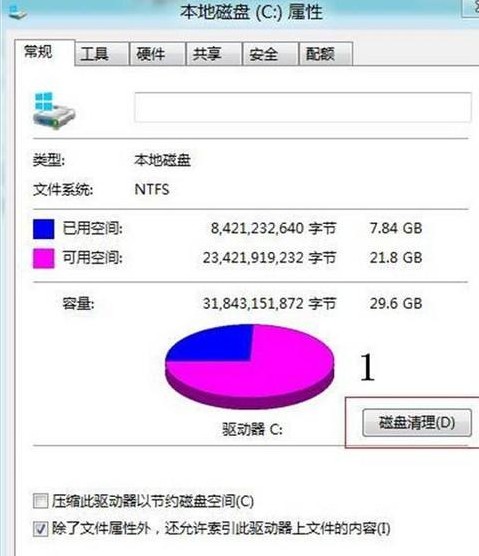
縮圖顯示錯誤通常因快取資料庫損毀。可透過磁碟清理或手動刪除 %USERPROFILE%\AppData\Local\Microsoft\Windows\Explorer 下的快取檔案重建。
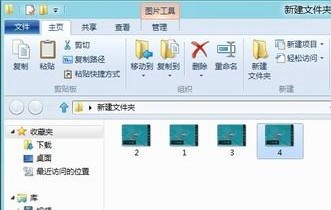
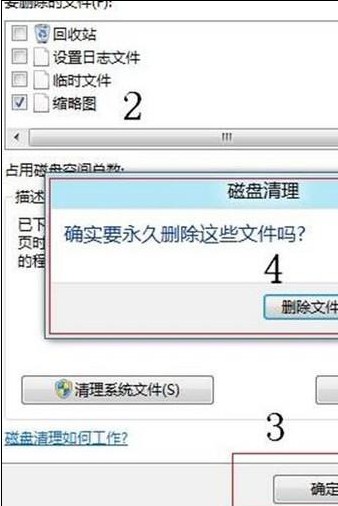
%USERPROFILE%\AppData\Local\Microsoft\Windows\Explorer 開啟資料夾。thumbcache_32.dbthumbcache_96.dbthumbcache_256.dbthumbcache_1024.db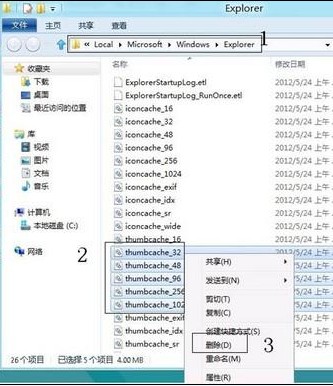
Win8/8.1 休眠選項消失找回:群組原則啟用顯示休眠 + powercfg 解決裝置喚醒衝突
Win8 預設閘道無法使用?四大修復方案:自動取得 IP、更新網卡驅動、固定 DNS 8.8.8.8、重啟路由器
不用工具也能查:一條 PowerShell 指令讀取預裝 Win8 產品金鑰
Win8 應用管理工具:圖形化介面批次移除預設 Metro App、清理安裝快取、識別殘留/舊版本、保護核心運行庫
Win8進入安全模式的兩種方法:設定介面/系統配置雙通道圖文詳解
Win8 網頁影片快取檔案位置在哪?用 VideoCacheView 一鍵找到