Windows XP Windows 7 Windows 2003 Windows Vista Windows 綜合教學 Linux 系統教學
Windows 10 Windows 8 Windows 2008 Windows NT Windows Server 電腦軟體教學

Win8 網頁影片快取檔案位置在哪?用 VideoCacheView 一鍵找到

編輯:Win8 系統應用技巧

快速找回瀏覽器影片快取

許多使用者以為 Win8 的網頁影片快取位於 Temporary Internet Files,實際上現代瀏覽器快取機制已改變,傳統清理工具無法完整找出所有快取檔。推薦使用免費小工具 VideoCacheView 自動掃描全系統。

操作步驟

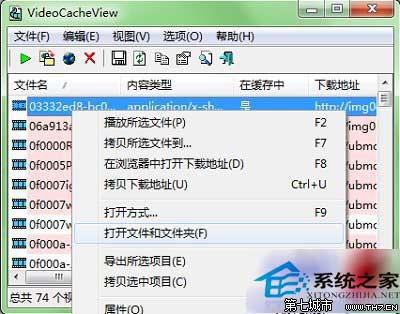
  1. 下載 VideoCacheView 並解壓縮,雙擊執行 VideoCacheView.exe,軟體會自動掃描系統中的影片快取檔。
  2. 在結果清單中對目標檔案按右鍵,選擇「開啟檔案與資料夾位置」。
  3. VideoCacheView 右鍵選單
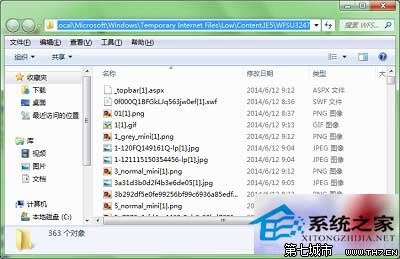
  4. 即可直接開啟該快取檔案所在資料夾,方便複製、備份或播放。
  5. 開啟快取資料夾位置

補充說明

網路上常見的「Internet 選項清除暫存檔」或第三方清理軟體,通常只能清除傳統 IE 快取,無法處理 Chrome、Firefox、Edge 等現代瀏覽器的快取機制。VideoCacheView 支援多種瀏覽器,更完整且精準。

Copyright © Windows教程網 All Rights Reserved