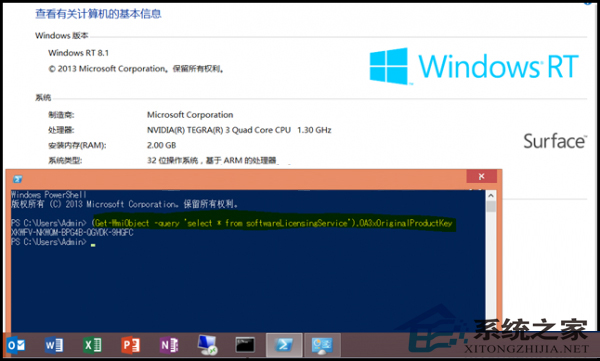
許多人習慣用第三方工具查看預裝 Windows 8 的產品金鑰,其實只需一行 PowerShell 指令即可快速取得,適用於採用 OA 3.0 技術的預裝 Windows RT、8、8.1、Server 2012 等版本。
(Get-WmiObject -query 'select * from SoftwareLicensingService').OA3xOriginalProductKey
不再需要下載額外軟體,一行指令即刻掌握金鑰資訊。
Windows 8 開機無法按 F8 進入修復模式?教你手動進入進階啟動選項
Win8 ADSL 撥號頻繁斷線?關閉「閒置自動斷線」徹底解決
Win8/8.1 IE10/IE11 無法顯示 Flash?兩大官方修復方案
Win 8.1 安裝 Win 10 雙系統完整教學:壓縮分區建立新磁碟區、掛載 ISO 升級安裝
Win8 查看圖片發黃?ICC 色彩設定檔衝突一招解決
Windows 8 任務列圖示合併/隱藏/不合併設定教學:三種模式隨心切換
Win8.1 更新失敗錯誤 80240054?DISM 修復系統映像完整教學
破解 Windows 8 解析度過低無法執行 Metro 應用程式限制