使用 Ghost 安裝 Win8 時出現「Question 1868」錯誤:Ghost 偵測到磁碟磁區與作業系統磁區不一致,可能導致寫入失敗。錯誤訊息建議重新開機,但若重複出現需針對根本原因處理。
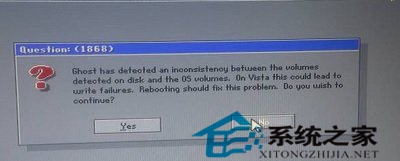
Ghost has detected an inconsistency between the volumes detected on disk and the OS volumes, on Vista this could lead to write failures. Rebooting should fix this problem, Do you wish to continue?
Ghost 偵測到磁碟磁區與作業系統磁區存在不一致,在 Vista 上可能導致寫入失敗。重新開機可能解決此問題,是否繼續?
補充建議:Win8 對舊式硬體相容性有限,若硬體過舊建議升級記憶體、改用 SSD 等,成本較低且能大幅改善體驗。