安裝 Office 2007 時彈出 Osetup.DLL 錯誤,通常是安裝包內該檔案損壞。從同目錄下的 ProPlus.WW.cab 提取完整檔案覆蓋即可修復。
E:\Office2007\ProPlus.WW\Osetup.DLL)。ProPlus.WW.cab(約 260MB)。Osetup.dll。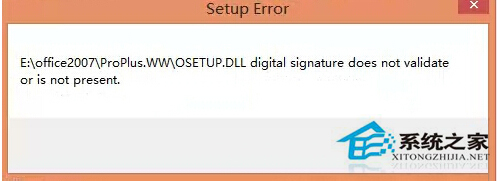
此法適用於各類安裝包缺少或損壞 DLL 的情況,核心在於從 CAB 還原原始檔案。
Windows 8 設定無線網路共享 (虛擬 AP 熱點) 完整教學:netsh 指令建立託管網路、ICS 共用、批次檔自動啟動
Win8 設定多螢幕擴展顯示:螢幕解析度或裝置 Charms 兩種方式
Windows 8 筆電建立 Wi-Fi 熱點共享上網:虛擬網卡指令法完整教學
Windows 8.1 撥號上網 651 錯誤解決方案:開機自動撥號腳本法
Windows 8.1 錯誤代碼 80070460?Windows RE 修復環境遺失修復法
WinMetro:在 Windows 7 體驗 Windows 8 Metro 介面完整教學