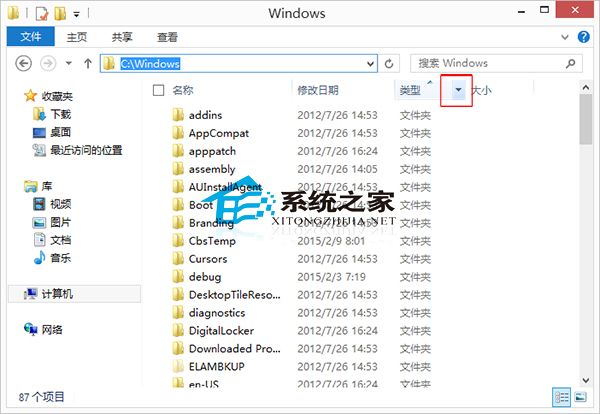
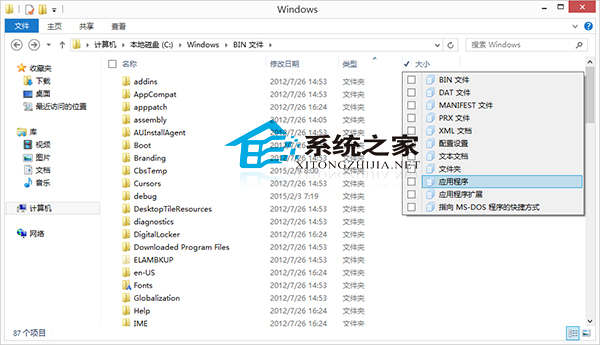
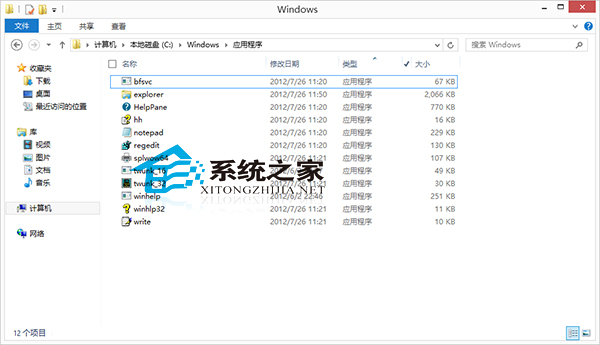
Windows 8.1 檔案總管在「詳細資料」檢視模式下,點擊「類型」欄位標題右側的下拉箭頭,即可勾選特定檔案類型(如「應用程式」、「文字文件」、「圖片」),瞬間篩選出同類檔案,大幅縮小搜尋範圍。
此功能結合欄位排序、群組依據,構成強大的視覺化檔案管理工具組。
Windows 8.1 設定登入後直接進入傳統桌面
x86 架構平板電腦安裝 Windows 8 完整實戰:硬體需求、TF 卡開機碟製作、BIOS 設定與安裝流程
Win8 瀏覽器莫名自動彈出網頁?三步權限封鎖法徹底根治
Win8 應用商店下載錯誤 80073cf0?重命名 SoftwareDistribution 快取資料夾
Win8 圖片庫新增照片完整步驟教學
Win8.1 安裝工行網銀助手報錯怎麼辦?管理員命令列執行 MSI 安裝
Windows 8 開機藍屏「您的電腦遇到問題需要重新啟動」修復指南
ThinkPad 電源管理器不相容 Win8?安裝 V6.30 再透過 System Update 升級解決