Windows 8 應用商店下載/安裝應用失敗,錯誤代碼 0x80073CF0 (ERROR_PACKAGE_INSTALL_FAILED),主因是 Windows Update 快取 (`SoftwareDistribution`) 與商店快取不一致或損毀。
net stop wuauservren C:\Windows\SoftwareDistribution SoftwareDistribution.oldnet start wuauserv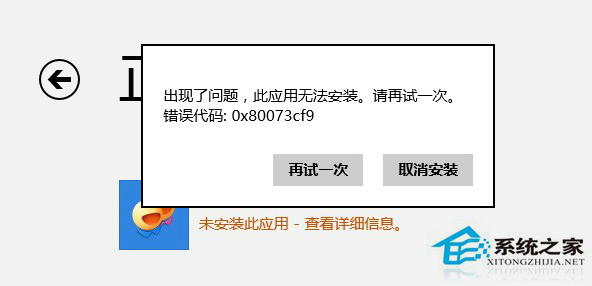
若仍失效,進一步執行 wsreset.exe 重置商店 App,或 PowerShell 重新註冊商店套件:
Get-AppXPackage -AllUsers -Name Microsoft.WindowsStore | Foreach {Add-AppxPackage -DisableDevelopmentMode -Register "$($_.InstallLocation)\AppXManifest.xml"}
此錯誤與 0x80244019 同屬快取不一致類,重命名 SoftwareDistribution 為核心解法。
Win8 更新錯誤 8024200D?DISM 指令修復元件存放區快速解決
關閉 Windows 8.1 免費更新通知:群組原則法與登錄法雙管齊下
Windows 8 修改系統字體教學:使用 MacType 工具完整圖文指南 (含載入模式選擇與字體套用)
Windows 8.1 系統熱備份與自訂復原映像:recimg 指令建立含應用程式的還原基準
Win10 IE 瀏覽器提示缺少 Flash?系統目錄修復與註冊 Flash.ocx 完整步驟
Win8 桌面背景突然變黑?刪除註冊表 LogPixels 值恢復
Windows 8 爆高危漏洞:啟動載入器安全機制反驅駭客開發感染硬體固件惡意軟體,McAfee 預警 2012 安全趨勢