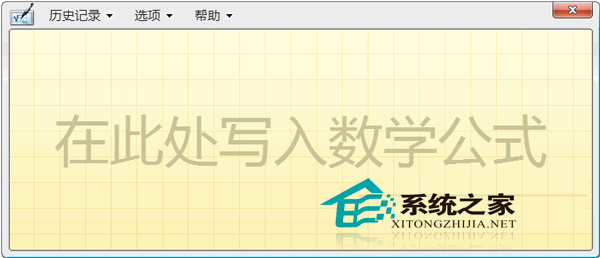
需要輸入複雜數學公式時,Windows 8.1 內建的「數學輸入面板」支援手寫辨識,使用方式如同輸入法的手寫功能。最快開啟方式是使用「執行」指令。
mip
面板支援滑鼠或觸控螢幕手寫輸入,系統會即時辨識並顯示對應的數學符號與公式,輸入完成後可直接插入文件。此法比透過「搜尋」超級按鈕查找更快捷。
Win8.1 任务管理器启动项出现 "Program" 条目?可安全禁用,系统配置工具验证
Windows 8 無法使用 3G 上網卡 (天翼) 完整設定教學
Windows 8.1 檔案總管中隱藏 SkyDrive 特定資料夾的方法
Win8.1 分畫面功能(Snap)完整操作教學
Windows 8 Metro 應用切換三大法:滑鼠左上角、Win+Tab、Alt+Tab 完整操作指南
Win8 關閉程式相容性助理:services.msc 停用服務、或 gpedit.msc 群組原則關閉
Win7 64位純淨版系統刻錄 CD 音樂光碟教學:Windows Media Player 內建功能
Win8.1 關閉 UAC 彈窗但保留功能:用 Microsoft ACT 建立白名單信任應用