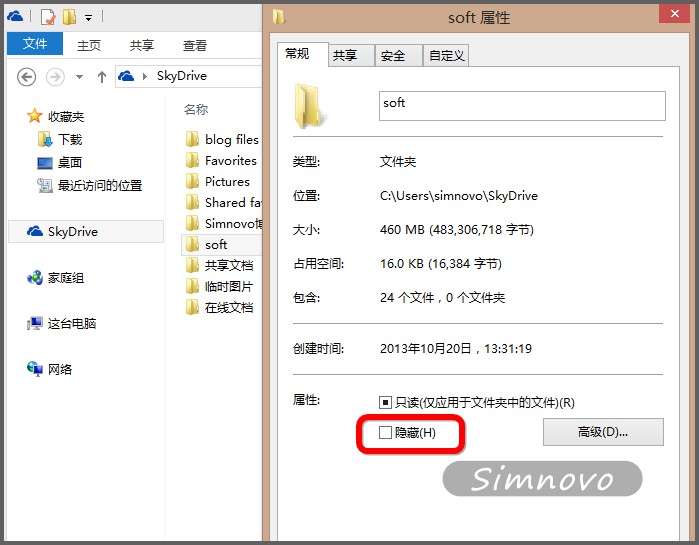
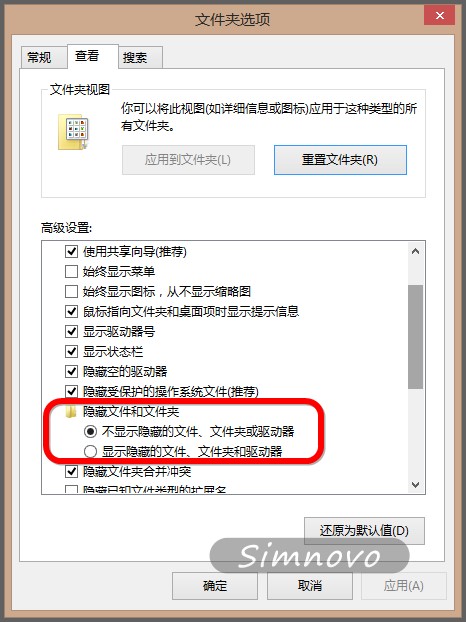
此法利用 NTFS 隱藏屬性配合檔案總管顯示設定,達到在 SkyDrive 同步資料夾中隱藏特定資料夾的目的。
Win8 命令提示字元輸入指令報錯?切換英文輸入法即可解決
如何重裝 Windows 8.1:內建「移除所有內容並重新安裝 Windows」完整實作教學
Windows 8 關閉開始畫面執行中應用程式兩種方法
Windows 8 自動更新常見問題完整解答:啟用方法、檢查頻率、費用、歷程記錄、重開機提示、疑難排解
1GB 記憶體能安裝 Windows 8.1 嗎?實測與建議
Win8.1 玩《龍珠超宇宙》閃退停止工作?三大主因與對策
聯想筆電 Win 8 電源管理 8.0 風扇除塵功能啟用全教學
Windows 8.1 預覽版商店升級完整圖文教學