Windows XP Windows 7 Windows 2003 Windows Vista Windows 綜合教學 Linux 系統教學
Windows 10 Windows 8 Windows 2008 Windows NT Windows Server 電腦軟體教學

Win 8 移除開機選單一鍵 Ghost 選項的 EasyBCD 操作法

編輯:Win8 系統應用技巧

安裝 Ghost 版 Windows 8 後開機選單殘留「一鍵 Ghost」選項,使用 EasyBCD 圖形化工具刪除該開機項目,操作直觀安全,並可備份 BCD 供日後恢復。
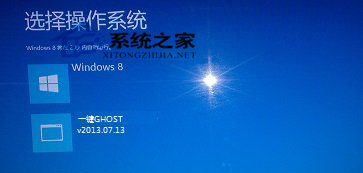
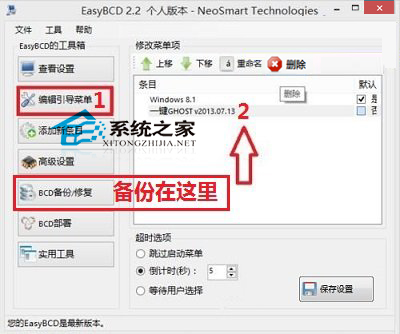
操作步驟

  1. 安裝並執行 EasyBCD
  2. 左側選單「編輯開機選單」
  3. 右側清單找到「一鍵 Ghost」項目 → 選中 → 點擊上方「刪除」按鈕
  4. 關閉 EasyBCD → 重新開機驗證開機選單已淨化

EasyBCD 介面

刪除一鍵 Ghost 項目

備份與恢復

刪除前建議:左側「BCD 備份/修復」→「備份設定」→ 儲存 .bcd 檔案。若日後需恢復「一鍵 Ghost」選項,同介面「還原設定」載入備份檔即可。

命令列替代方案

熟悉 bcdedit 者可直接:
bcdedit /enum 找到一鍵 Ghost 項目識別碼 → bcdedit /delete {識別碼}。EasyBCD 本質為 bcdedit 圖形化封裝。

Copyright © Windows教程網 All Rights Reserved