Windows 8.1 檔案總管 會出現 CPU 高佔用、工作列無回應、無法關機的卡死狀況,微軟已發布 KB3048778 更新修復此 Bug。安裝該更新並重開機即可解決。
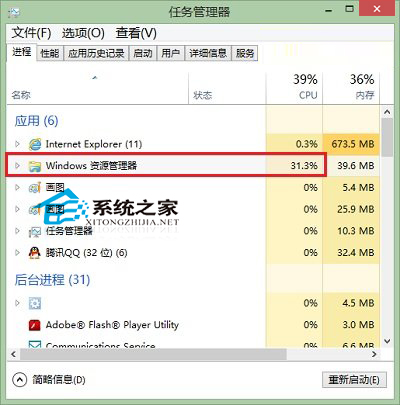
若暫時無法安裝更新,可嘗試:「資料夾選項」→「檢視」→ 勾選「在獨立程序中啟動資料夾視窗」→ 套用。將每個資料夾視窗獨立為獨立 explorer.exe 程序,單一視窗卡死不影響整體。
KB3048778 修復 shell32.dll 中佇列處理邏輯競爭條件,導致特定 Shell 擴充功能觸發無限迴圈佔用 CPU。屬於經典的 Shell 擴充功能相容性 Bug。
Win8 如何設定開機直接進入桌面?控制台→外觀和個人化→更改主題→工作列和導航→勾選「登入時直接進入桌面」
Windows 8 螢幕鍵盤 4 種開啟方法:輕鬆存取中心、所有應用程式、工作列工具列、osk 指令
Win8 筆記本連線 WiFi 完整圖文教學:側邊欄網路面板操作
Win8 強制下載被標記為不安全的檔案:SmartScreen 篩選暫時關閉或「仍然執行」繞過封鎖
Win8 报错 0x80070005 拒绝访问?以管理员身份运行 CMD 重新注册 DLL 解决
惠普筆電 Win8 取消指紋/藍牙開機驗證:Client Security Manager 設定
Windows 8.1 手動清理 WinSxS 冗餘更新:DISM 指令 StartComponentCleanup 與 ResetBase