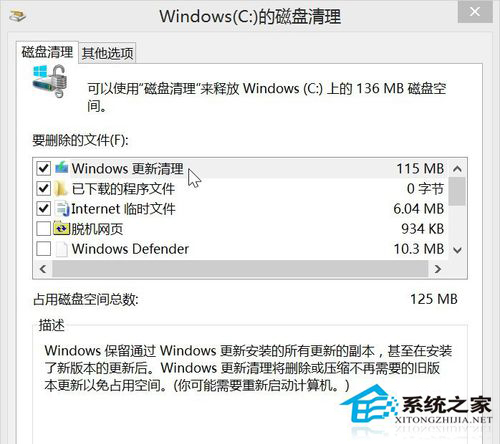
Windows 8 更新快取佔用大量空間,一般磁碟清理無法顯示。關鍵步驟為點選「清理系統檔案」掃描後,勾選「Windows Update 清理」即可安全移除。
清理後列表不再出現該選項,直到下次安裝新更新補丁。此為官方安全清理管道,不影響系統穩定性。
Win8 離線安裝 .NET Framework 3.5:掛載 ISO 用 DISM 一鍵啟用,避開 0x800F0906 線上安裝失敗
Windows 8.1 圖片密碼建立教學(精簡版)
Win8 Foxmail 寄信提示「收件密碼錯誤」實為伺服器設定問題
Windows 8 安裝非即插即用裝置:以 USB 3G 上網卡為例
Win8 關機四大法全解析:從傳統到隱藏技巧一網打盡
惠普 Win8 筆電建立「儲存空間」 (Storage Spaces) 教學:整合多顆硬碟提升資料保護
Windows 8 個人化主題下載安裝全攻略:官方主題站、全景雙螢幕壁紙、.deskthemepack 格式解析
Win8.1 安裝小米隨身 WiFi 驅動程式:相容模式設為 Windows 8 解決建立失敗